
中草解说短视频-MCP&Agent挑战赛
ZhongYao MCP 服务器是一个基于火山引擎豆包大模型API和MCP(Model Context Protocol)协议的AI工具服务器,专注于中草药领域。它提供了一系列强大的多模态内容生成工具,极大地简化了中草药科普内容的创作过程。
MCP 服务配置
复制以下 JSON 到 OPClaw 或其他 MCP 客户端的配置文件中即可使用
{
  "mcpServers": {
    "zhongyao-mcp-server": {
      "args": [
        "zhongyao-mcp-server"
      ],
      "command": "uvx",
      "description": "提供中药信息查询、文案、语音、视频生成及最终合成的服务。",
      "name": "中药AI视频生成服务"
    }
  }
}该服务需要配置环境变量:COS_BUCKET、COS_REGION、COS_SECRET_ID、COS_SECRET_KEY、DOUBAO_API_KEY、DOUBAO_BASE_URL、DOUBAO_CHAT_MODEL、DOUBAO_IMAGE_MODEL、DOUBAO_VIDEO_MODEL、TTS_API_KEY、TTS_BASE_URL
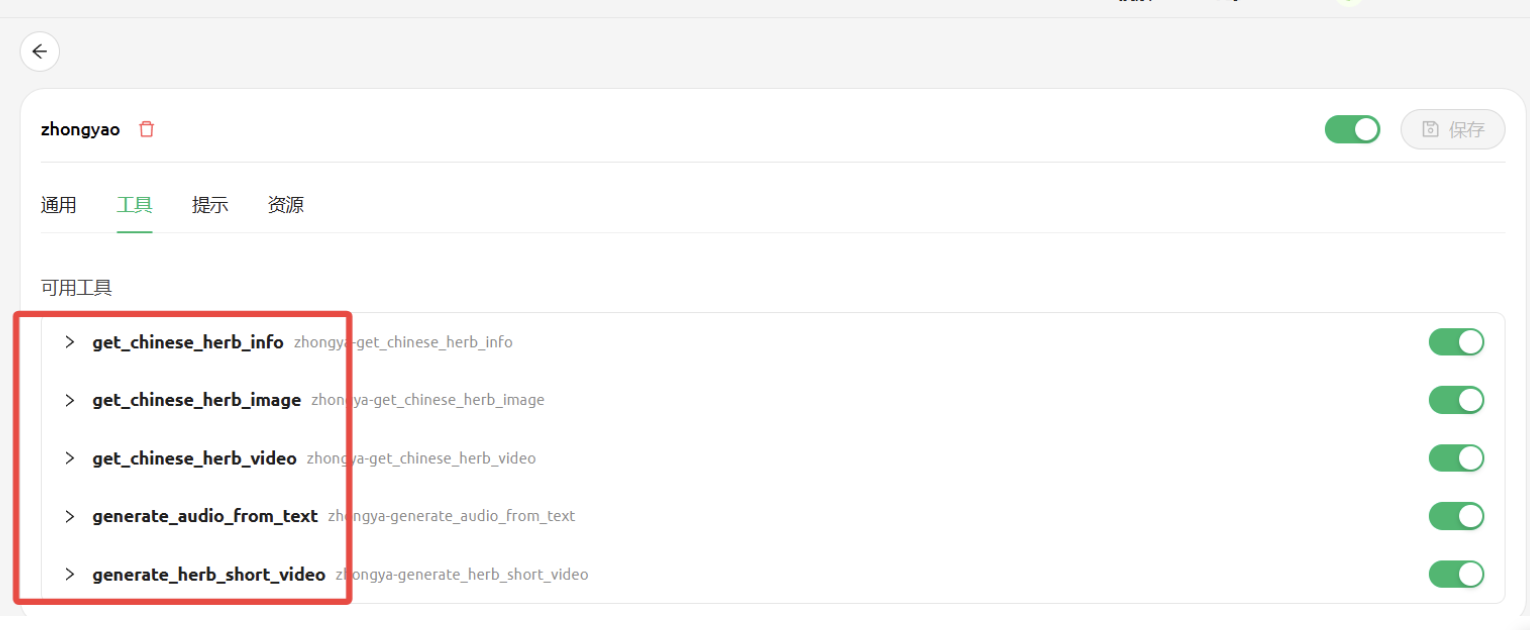
可用工具 (5 个)
该服务在 MCP 协议中暴露的工具,AI 可按需调用
get_chinese_herb_info 2 个参数 需填 1 项
必填参数:herb_name
get_chinese_herb_image 3 个参数 需填 1 项
必填参数:herb_name
get_chinese_herb_video 4 个参数 需填 1 项
必填参数:herb_name
generate_audio_from_text 3 个参数 需填 1 项
必填参数:text
generate_herb_short_video 1 个参数 需填 1 项
必填参数:herb_name
服务介绍
ZhongYao MCP Server
Project Overview
zhongyao-mcp-server is an AI tool server based on the Volcano Engine Doubao large model API and the MCP (Model Context Protocol) protocol. It focuses on the field of traditional Chinese medicine, providing a series of powerful multimodal content generation tools. Through this server, users can easily generate complete short videos containing detailed information, images, voice explanations, and video for specified Chinese herbs in MCP-supported clients (such as Trae, Cherry Studio) with a one-click operation.
The core of the project is to encapsulate complex, multi-step, multimodal generation processes (including data retrieval, copywriting, text-to-speech, video generation, and post-production) into simple and easy-to-use tools, greatly simplifying the creation process of TCM popular science content.
Core Functionality:
- Text-to-Image: Generate high-quality images based on text descriptions
- Text-to-Speech: Generate TTS voice broadcasts based on text
- Text-to-Video: Generate video content based on text descriptions
- Image-to-Video: Generate dynamic videos based on images and text descriptions
- Model Configuration: Support for multiple Doubao AI models
Supported AI Models:
- Language Model: deepseek-v3-250324
- Text-to-Image Model:
doubao-seedream-3-0-t2i-250415 - Image-to-Video Model:
doubao-seedance-1-0-lite-i2v-250428 - Text-to-Video Model:
doubao-seedance-1-0-lite-t2v-250428 - Text-to-Speech: edgetts (free)
Deployment Guide
Environment Dependencies
- Python >= 3.11
- Volcano Engine Doubao API Key
This MCP dependency package is managed using uv, so the pyproject.toml file is:
json
dependencies = [
"mcp[cli]>=1.9.4", # Add requests dependency
"requests>=2.31.0",
"openai>=1.86.0",
"cos-python-sdk-v5==1.9.33",
"moviepy==1.0.3",
"httpx",
]
Configuration File Explanation
We use config.ini for the configuration file, with the following content:
ini
config.ini
[API]
api_key = YOUR_API_KEY_HERE
base_url = https://ark.cn-beijing.volces.com/api/v3
[Models]
Language Model
chat_model = deepseek-v3-250324
Text-to-Image Model
image_model = doubao-seedream-3-0-t2i-250415
Text-to-Video Model
video_model = doubao-seedance-1-0-lite-t2v-250428
[edgetts]
tts_api_key =zhouhuizhou
tts_base_url=https://edgettsapi.duckcloud.fun/v1
[common]
cos_region = ap-nanjing # Tencent Cloud OSS Storage Region
cos_secret_id = AKID003XXXXXXgO9qPl # Tencent Cloud OSS Storage SecretId
cos_secret_key = IZhavCXXXXXXXXXXX6i9NXUFqGTUOFvS # Tencent Cloud OSS Storage SecretKey
cos_bucket =tts-1258720957 # Tencent Cloud OSS Storage Bucket
font_path = /usr/share/fonts/truetype/wqy/wqy-zenhei.ttc
[Windows User Configuration]
imagemagick_binary = D:\develop\ImageMagick-7.1.1-Q16\magick.exe
font_path = SimHei
[Linux User Configuration]
imagemagick_binary = /home/ImageMagick/magick
font_path = /usr/share/fonts/truetype/wqy/wqy-zenhei.ttc
You need to modify the Volcano Engine api_key and Tencent Cloud OSS storage settings. Replace imagemagick_binary with the path where your program is installed.
For the container version (config.docker.ini), you only need to modify the Volcano Engine api_key and Tencent Cloud OSS storage settings; the imagemagick binary is pre-installed in the container image (no need to consider it).
Installation Methods
Method 1: Using pip
bash
pip install zhongyao-mcp-server
Method 2: Using uvx
bash
uvx zhongyao-mcp-server
Method 3: Using Docker (Recommended)
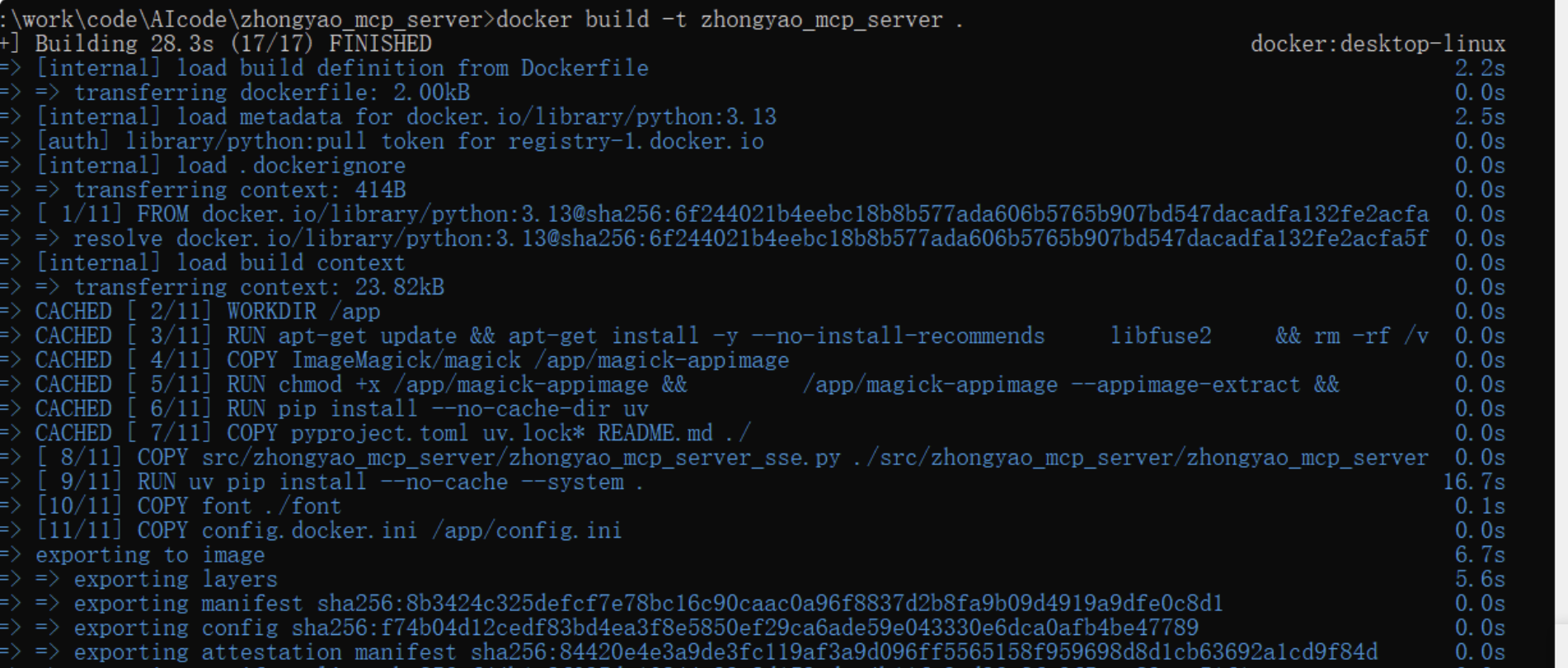
In the current directory, run the following command:
shell
docker build -t zhongyao_mcp_server .
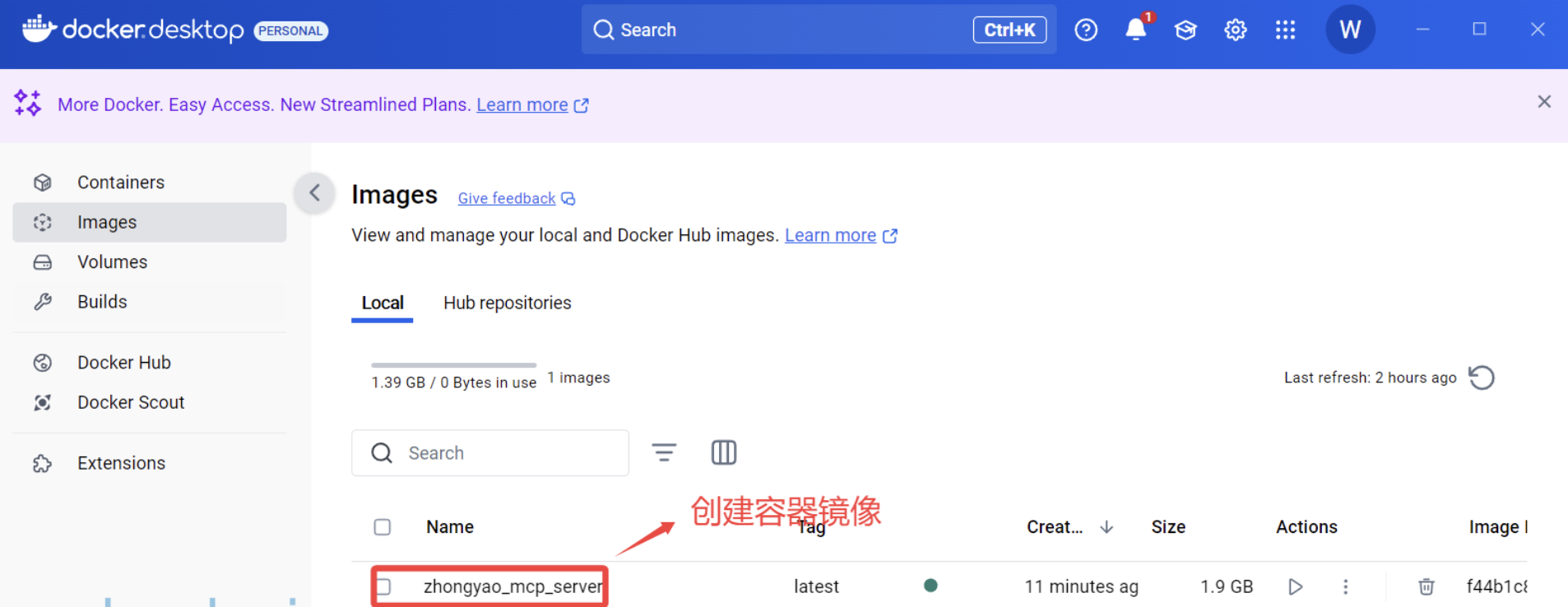
After building the image, you can view the container image:
Start and run the container:
shell
docker run -d -p 8003:8003 --name zhongyao_mcp_server_instance zhongyao_mcp_server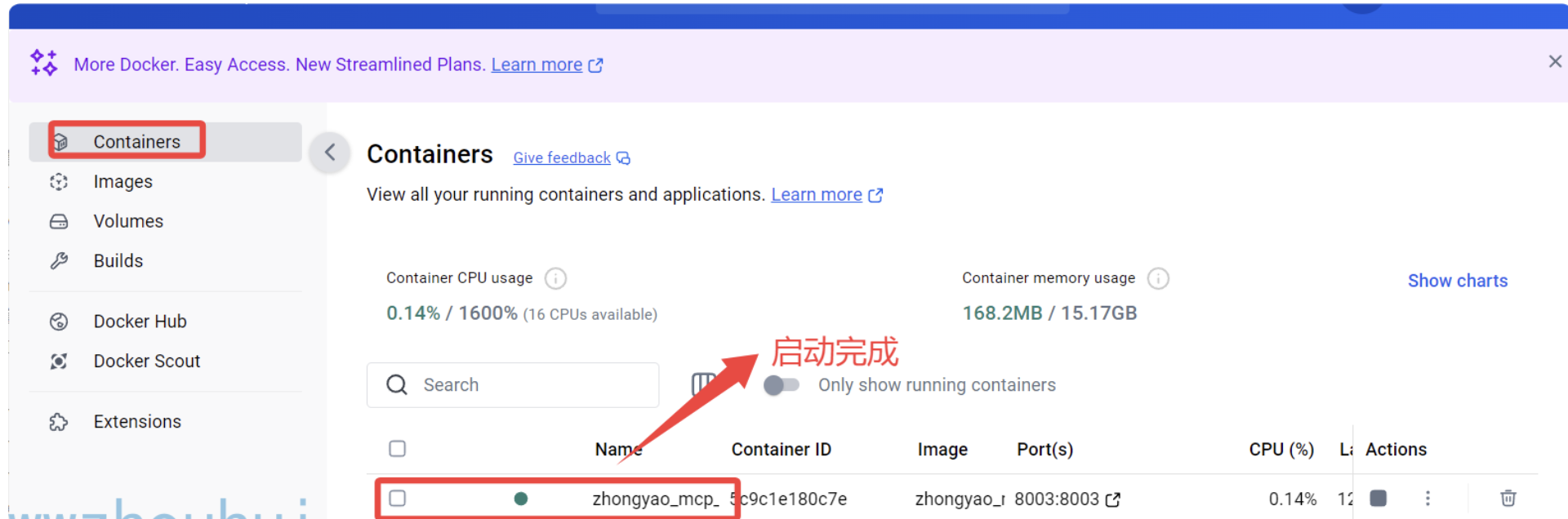
Client Configuration
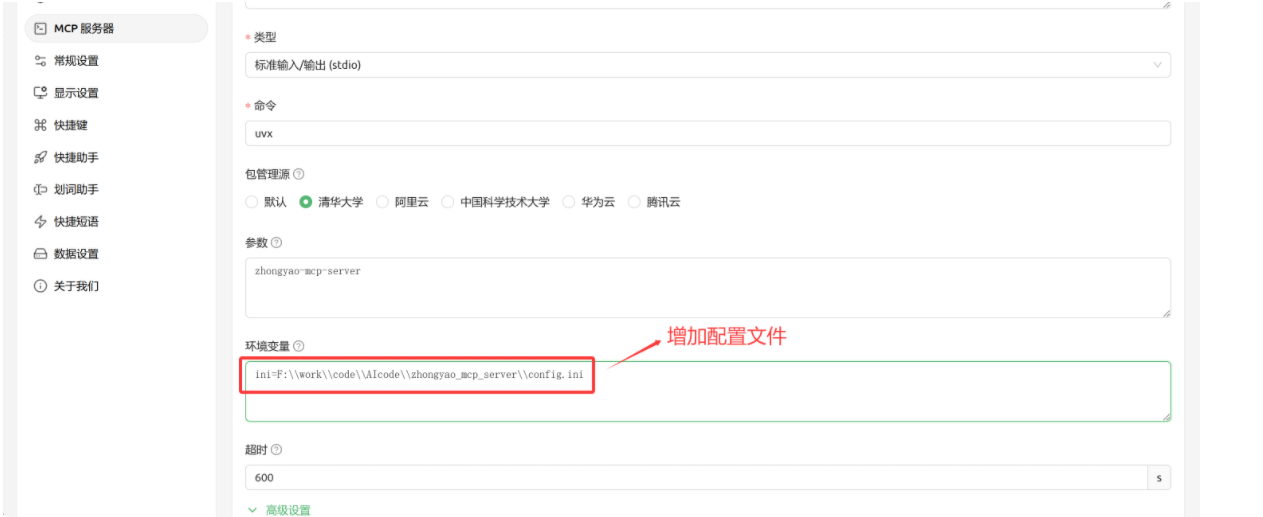
trae Configuration
Add the following configuration. Be sure to replace DOUBAO_API_KEY with your actual Volcano Engine Doubao API key.
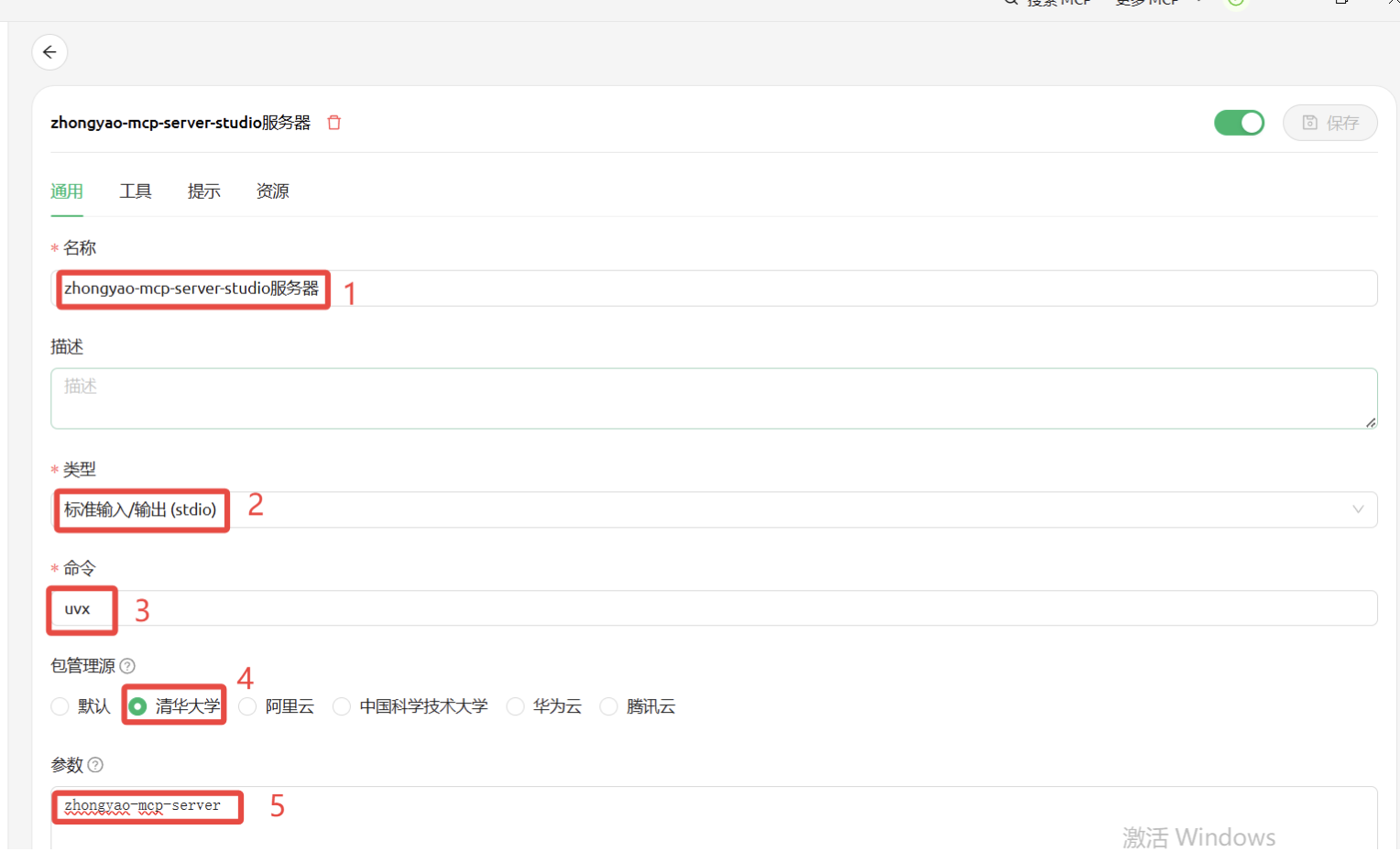
Configuration using a configuration file in studio:
json
{
"mcpServers": {
"zhongyao-mcp-server": {
"name": "Chinese Medicine AI Video Generation Service",
"description": "Provides services for querying Chinese medicine information, generating copy, voice, and video, and final synthesis.",
"command": "uvx",
"args": [
"zhongyao-mcp-server"
],
"env": {
"ini": "F:\work\code\AIcode\zhongyao_mcp_server\config.ini"
}
}
}
}
Loading from environment variables in studio:
json
{
"mcpServers": {
"zhongyao-mcp-server": {
"name": "Chinese Medicine AI Video Generation Service",
"description": "Provides services for querying Chinese medicine information, generating copy, voice, and video, and final synthesis.",
"command": "uvx",
"args": [
"zhongyao-mcp-server"
],
"env": {
"DOUBAO_API_KEY": "Volcano Engine APIKEY",
"DOUBAO_BASE_URL": "https://ark.cn-beijing.volces.com/api/v3",
"DOUBAO_CHAT_MODEL": "deepseek-v3-250324",
"DOUBAO_IMAGE_MODEL": "doubao-seedream-3-0-t2i-250415",
"DOUBAO_VIDEO_MODEL": "doubao-seedance-1-0-lite-t2v-250428",
"TTS_API_KEY": "Custom TTS Password",
"TTS_BASE_URL": "https://edgettsapi.duckcloud.fun/v1",
"COS_REGION": "ap-nanjing",
"COS_SECRET_ID": "AKID0036B**********zSI1VjgO9qPl",
"COS_SECRET_KEY": "IZhavCL********88XUFqGTUOFvS",
"COS_BUCKET": "tts-1258720957"
}
}
}
}
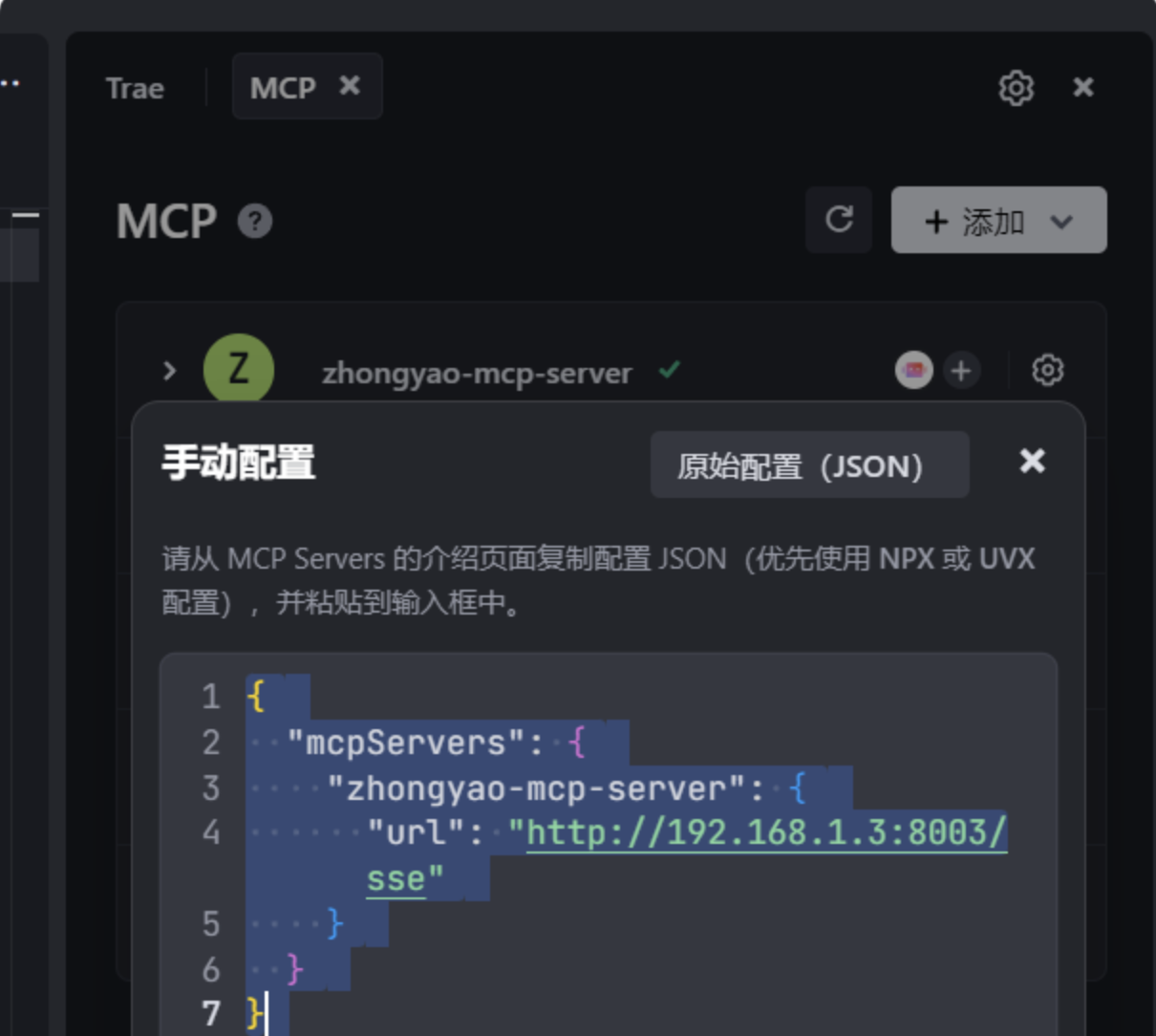
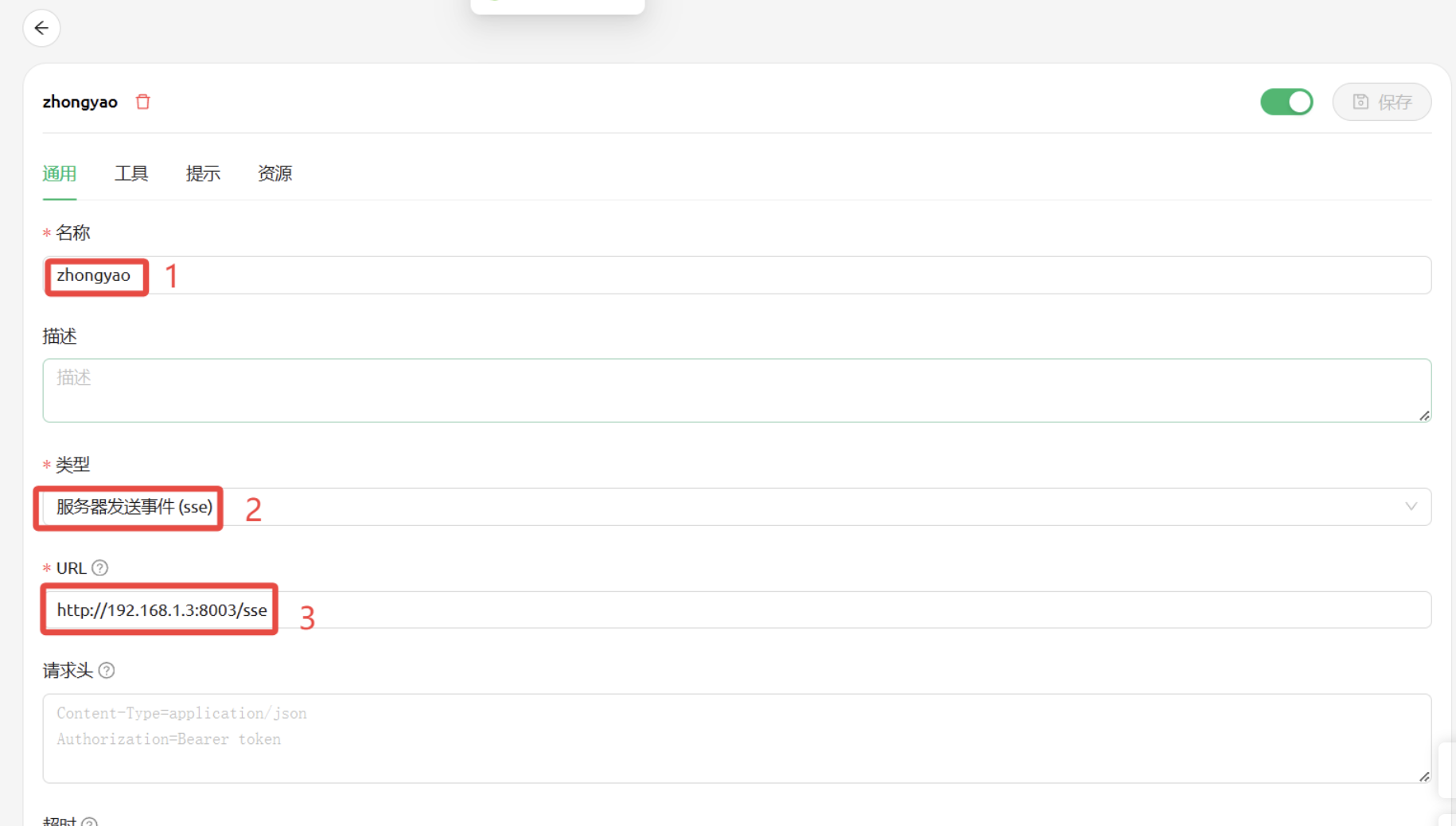
sse configuration:
json
{
"mcpServers": {
"zhongyao-mcp-server": {
"url": "http://192.168.1.3:8003/sse"
}
}
}
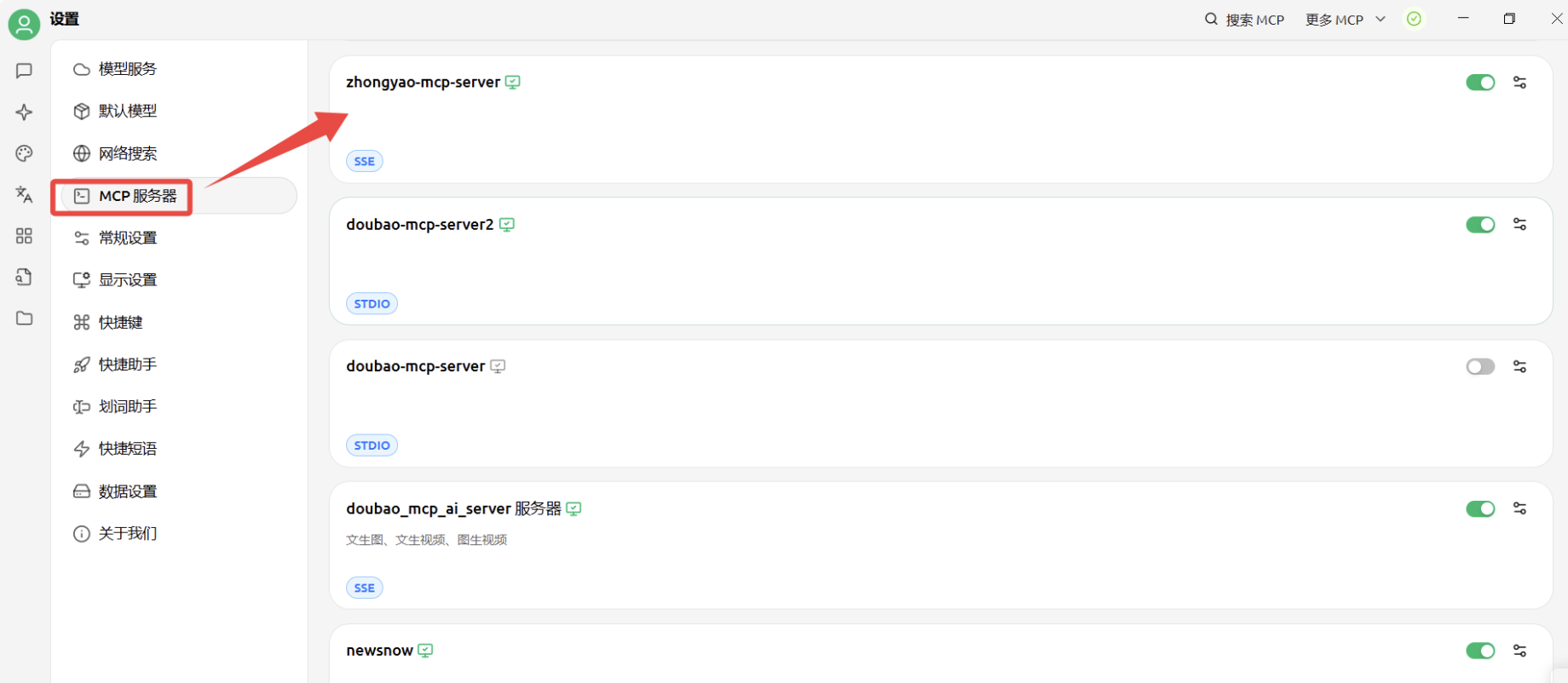
Cherry Studio Configuration
- Open Cherry Studio.
- Go to Settings → MCP Servers → Add Server.
- Configure the parameters:
- Name:
zhongyao-mcp-server - Description:
Chinese Medicine AI Generation Service - Type:
STDIO - Command:
uvx - Arguments:
zhongyao-mcp-server - Environment Variables: ini (the program depends on config.ini)
- Name:
- Click Save and Enable.
Detailed illustration:
sse configuration:
After configuring, you can check which tools are available:
stdio configuration:
Cross-Platform Considerations
To ensure smooth operation across different operating systems (such as Linux and Windows), please note the following:
- Configuration File
config.ini:- After packaging the project, the
config.inifile will not be automatically installed in the system path. You need to manually copyconfig.docker.inito the directory where you run the program and rename it toconfig.ini. - Modify the configuration items in
config.iniaccording to your actual environment, especially the API keys and paths of external tools.
- After packaging the project, the
- ImageMagick and FFmpeg:
- The
moviepylibrary depends on external toolsImageMagickandFFmpegto handle videos and images. These tools need to be installed separately and are not distributed with the Python package. - Installation: Please download and install
ImageMagickandFFmpegfrom their official websites based on your operating system.- ImageMagick: https://imagemagick.org/* Configuration: After installation, make sure to correctly configure the
imagemagick_binarypath in the[common]section of theconfig.inifile. For example:
- ImageMagick: https://imagemagick.org/* Configuration: After installation, make sure to correctly configure the
- Windows:
imagemagick_binary = D:\develop\ImageMagick-7.1.1-Q16-HDRI\magick.exe(please replace with your actual installation path) - Linux:
imagemagick_binary = /usr/bin/magick(if added to PATH, the full path may not be necessary)
- The
- If
imagemagick_binaryis not configured, MoviePy will attempt to find it in the system PATH. It is recommended to explicitly configure this to avoid potential issues.
API Key Acquisition
-
Visit Volcengine Console
-
Register and log in to your account
-
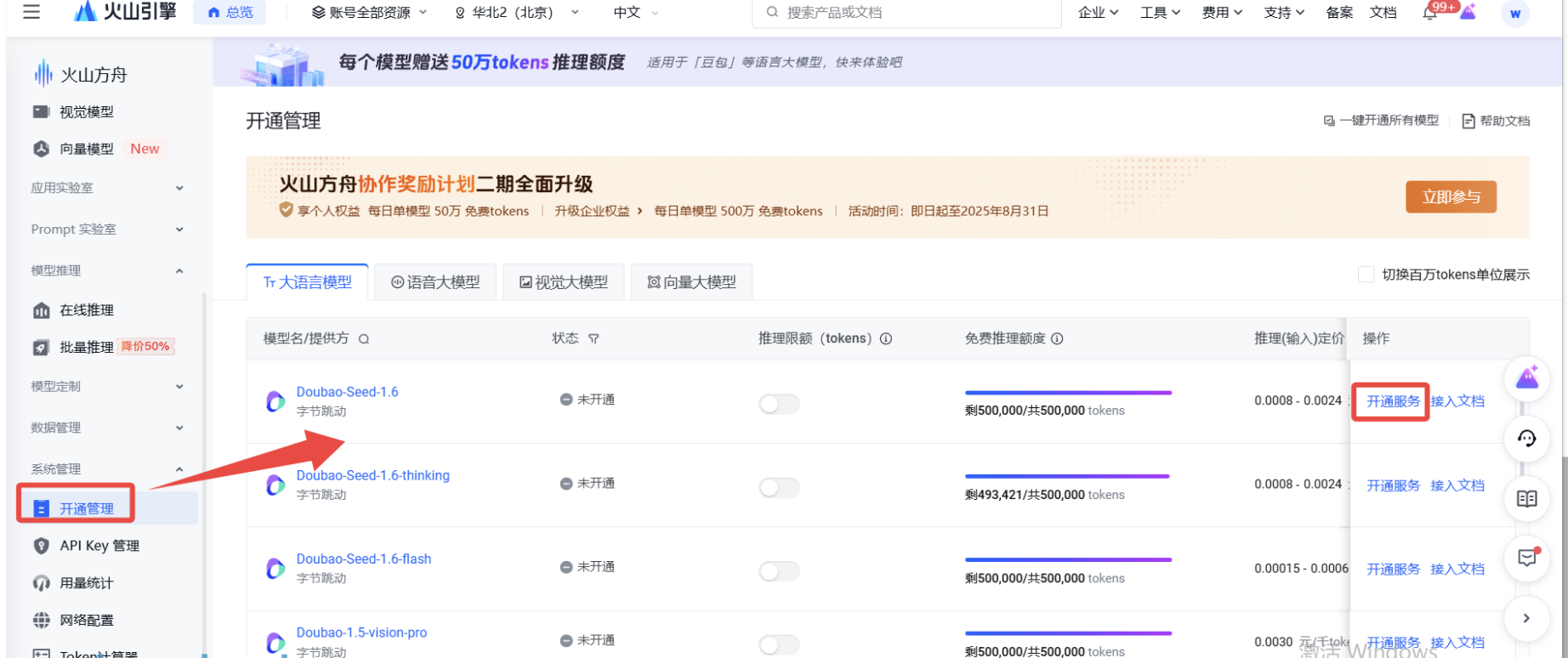
Activate the DouBao Large Model Service (you need to authorize each model separately)
For Volcengine models, you need to authorize each one separately. Click on "Activate Management"
-
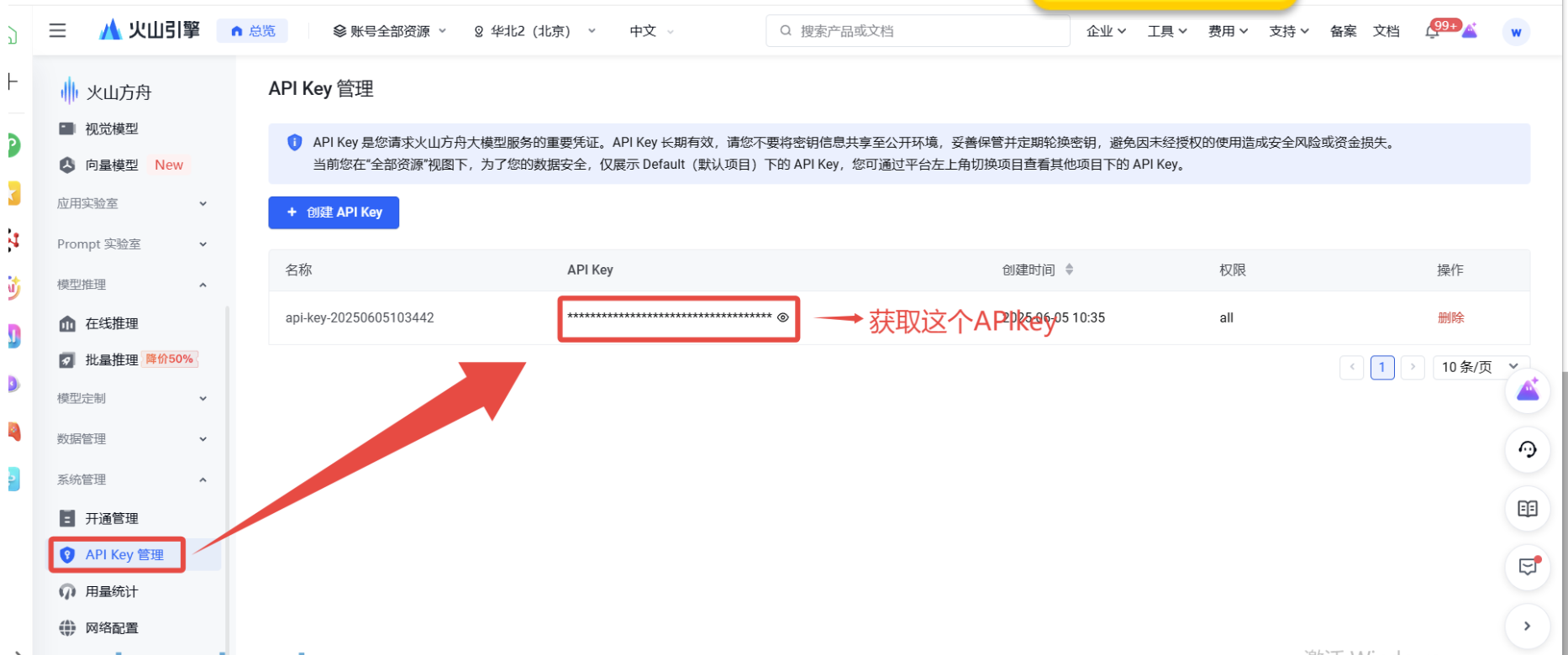
Create an API key in API Management
API Management
Available Tools
2. get_chinese_herb_info
Retrieve detailed information about Chinese herbs.
herb_name(string): Name of the Chinese herb.model(string, optional): The name of the model used to retrieve information, defaults toDEFAULT_CHAT_MODEL.
3. get_chinese_herb_image
Generate an image based on the name of a Chinese herb.
herb_name(string): Name of the Chinese herb.size(string, optional): Image size, default is "1024x1024".model(string, optional): The name of the model used for generating images, defaults toDEFAULT_IMAGE_MODEL.
Supported image sizes: 512x512, 768x768, 1024x1024, 1024x1792, 1792x1024
4. get_chinese_herb_video
Generate a video based on the name of a Chinese herb.
herb_name(string): Name of the Chinese herb.duration(string, optional): Video duration (in seconds), default is "8".ratio(string, optional): Video aspect ratio, default is "16:9".model(string, optional): The name of the model used for generating videos, defaults toDEFAULT_VIDEO_MODEL.
Supported video ratios: 16:9, 9:16, 1:1
5. generate_audio_from_text
Convert text to speech and upload it to COS.
text(string): Text to be converted into speech.voice(string, optional): Voice model, default is "zh-CN-XiaoxiaoNeural".speed(float, optional): Speech playback speed, default is 1.0.
6. generate_herb_short_video
Create a complete short video about a specific Chinese herb, including information retrieval, script generation, voice synthesis, and video synthesis.
herb_name(string): Name of the Chinese herb.
Usage Examples
1. Example of Retrieving Chinese Herb Information
bash
Use the get_chinese_herb_info tool to obtain detailed information about "Ginseng"
2. Example of Generating a Chinese Herb Image
bash
Use the get_chinese_herb_image tool to generate an image of "Goji Berry"
3. Example of Generating a Chinese Herb Video
bash
Use the get_chinese_herb_video tool to generate an 8-second video of "Angelica Sinensis"
4. Example of Converting Text to Speech
bash
Use the generate_audio_from_text tool to convert "Hello, this is a test voice." into speech
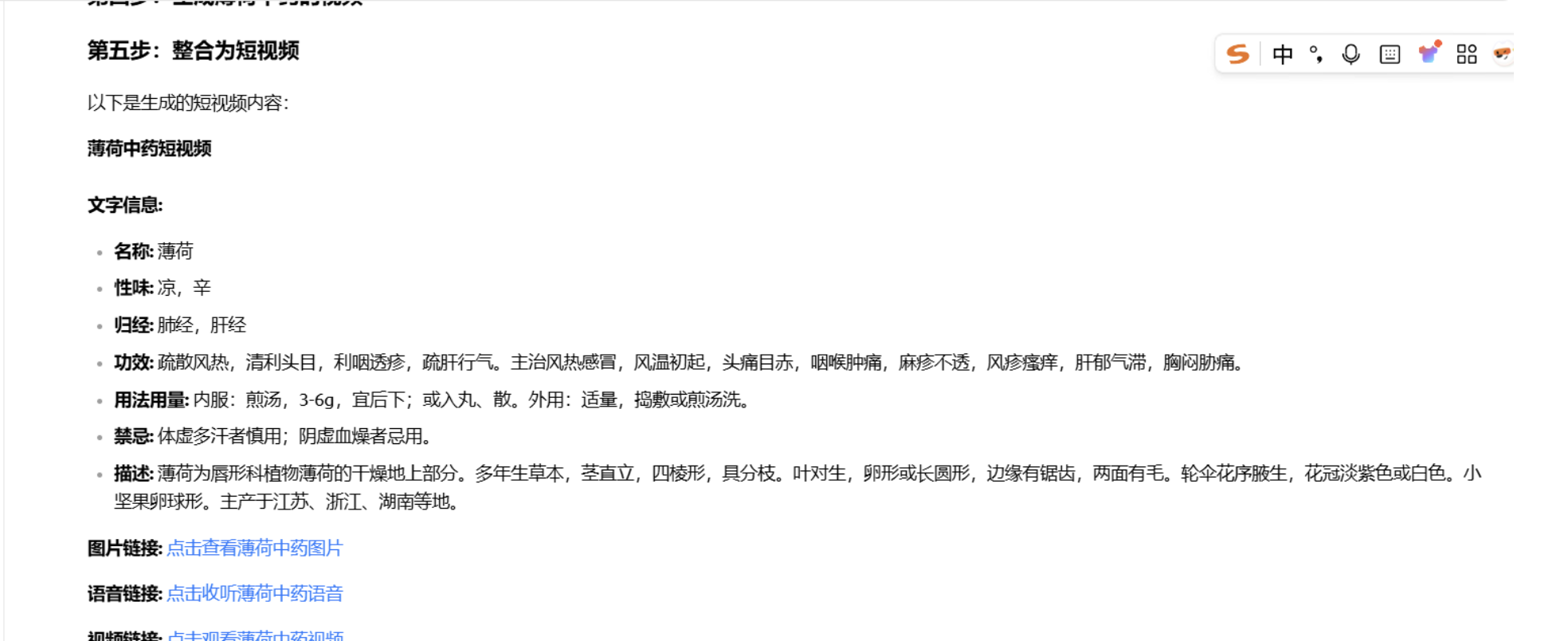
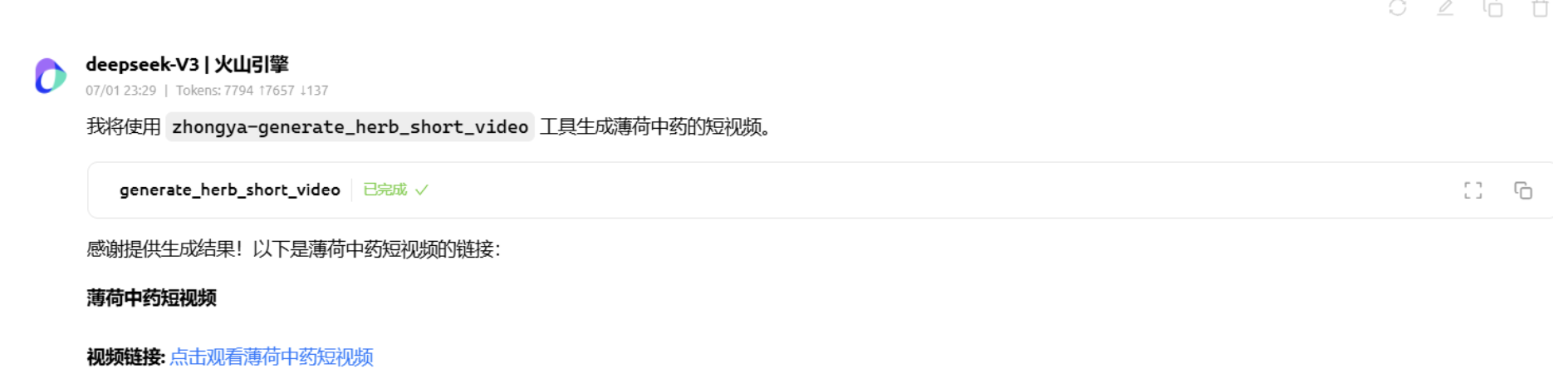
5. Example of Generating a Short Video About a Chinese Herb
bash
Use the generate_herb_short_video tool to create a short video about "Notoginseng"
Precautions
- Video generation tasks may take a long time to complete, please be patient
- Ensure that the API key has sufficient quota
- The URLs of generated content are time-limited, please save them promptly
Troubleshooting
Common Issues
- API Key Error: Make sure the API key is correct and valid
- Network Connection Issue: Check network connection and firewall settings
- Model Unavailable: Confirm that the model name being used is correct
Debug Mode
Enable detailed log output:
bash
uvx zhongyao-mcp-server --verbose## Project Information
License: MIT License
Author: zhouqingyu666 Email: zhouqingyu666@aisino.com
Version: v0.0.5
- Initial version release
- Supports text-to-image, text-to-video, image-to-video, text-to-speech, and short video generation for traditional Chinese medicine
- Integrates ByteDance Volcano Engine API and edgetts
Contributions: Welcome to submit Issues and Pull Requests to improve this project




