
mobvoi-mcp
官方的Mobvoi模型上下文协议(MCP)服务器,能够与Mobvoi强大的文本转语音、声音克隆、照片驱动虚拟形象、视频配音、视频翻译API进行交互。该服务器允许MCP客户端(如Cursor、Claude Desktop、Cline、Windsurf、OpenAI Agent及其他客户端)调用工具来生成语音、克隆声音、照片驱动虚拟形象、视频配音、视频翻译等更多功能。
MCP 服务配置
复制以下 JSON 到 OPClaw 或其他 MCP 客户端的配置文件中即可使用
{
  "mcpServers": {
    "Mobvoi": {
      "args": [
        "mobvoi-mcp"
      ],
      "command": "uvx",
      "env": {
        "APP_KEY": "your-api-key-here",
        "APP_SECRET": "your-api-secret-here"
      }
    }
  }
}该服务需要配置环境变量:APP_KEY、APP_SECRET、MOBVOI_MCP_REGION
可用工具 (9 个)
该服务在 MCP 协议中暴露的工具,AI 可按需调用
get_speaker_list 1 个参数
Obtain the list of speaker IDs from Mobvoi sound library and cloned by users themselves. Args: voice_type (str, optional): The type of voices to list. Values range ["all", "system", "voice_cloning"], with "all" being the default. Returns: Text content with the list of speaker IDs(include mobvoi_sound_library, user_cloned).
该工具无需必填参数,直接调用即可
text_to_speech 9 个参数 需填 1 项
The text_to_speech service of Mobvoi. Convert text to speech with a given speaker and save the output audio file to a given directory. Directory is optional, if not provided, the output file will be saved to $HOME/Desktop. You can choose speaker by providing speaker parameter. If speaker is not provided, the default speaker(xiaoyi_meet) will be used. [WARNING] COST WARNING: This tool makes an API call to Mobvoi TTS service which may incur costs. Only use when explicitly requested by the user. Args: text (str): The text to convert to speech. speaker (str): Determine which speaker's voice to be used to synthesize the audio. audio_type (str): Determine the format of the synthesized audio. Value can choose form [pcm/mp3/speex-wb-10/wav]. speed (float): Control the speed of the synthesized audio. Values range from 0.5 to 2.0, with 1.0 being the default speed. Lower values create slower, more deliberate speech while higher values produce faster-paced speech. Extreme values can impact the quality of the generated speech. Range is 0.7 to 1.2. rate(int): Control the sampling rate of the synthesized audio. Value can choose from [8000/16000/24000], with 24000 being the deault rate. volume(float): Control the volume of the synthesized audio. Values range from 0.1 to 1.0, with 1.0 being the default volume. pitch(float): Control the pitch of the synthesized audio. Values range from -10 to 10, with 0 being the default pitch. If the parameter is less than 0, the pitch will become lower; otherwise, it will be higher. streaming(bool): Whether to output in a streaming manner. The default value is false. output_directory (str): Directory where files should be saved. Defaults to $HOME/Desktop if not provided. Returns: Text content with the path to the output file and name of the speaker used.
必填参数:text
voice_clone 2 个参数 需填 2 项
The voice_clone service of Mobvoi. Clone a voice from a given url or local audio file. This tool will return a speaker id which can be used in text_to_speech tool. [WARNING] COST WARNING: This tool makes an API call to Mobvoi TTS service which may incur costs. Only use when explicitly requested by the user. Args: is_url (bool): Whether the audio file is a url. audio_file (str): The path or url of the audio file to clone.
必填参数:is_url、audio_file
play_audio 1 个参数 需填 1 项
Play an audio file. Supports WAV and MP3 formats.
必填参数:input_file_path
photo_drive_avatar 2 个参数 需填 2 项
Generate a video from a given image URL and an audio URL. If a person is in the image, the video will be a talking head video, driven by the audio. It will consume some time to generate the video, wait with patience. It will return a text message indicating that the task is submitted successfully, task id will be returned. After getting the task id, you may use the query_photo_drive_avatar tool to query the result of the task. [WARNING] COST WARNING: This tool makes an API call to Mobvoi which may incur costs. Only use when explicitly requested by the user. Args: image_url: The URL of the image to use in the video. audio_url: The URL of the audio to use in the video. Returns: A text message indicating the success of the video generation task, task id will be returned if success.
必填参数:image_url、audio_url
query_photo_drive_avatar 2 个参数 需填 1 项
Query the result of the photo drive avatar task. It will return a text message indicating that the task is completed and the video is saved to the output directory. If the output directory is not specified, only result url will be returned. If the return status indiacting the task is still running, you may use this tool again after a while. Args: task_id: The task id of the photo drive avatar task. output_dir: The directory to save the generated video, you can send the absolute path of the current working directory. The result will be saved into $output_dir/$task_id/result.mp4. Returns: A text message indicating the status of the task. Result url will be returned if success, saved path will be returned if output directory is specified.
必填参数:task_id
video_dubbing 2 个参数 需填 2 项
This tool aims to perform the voice over task, which generates a video from a given video URL and an audio URL. The result video will be a talking head video, with lip sync driven by the audio. It will consume some time to generate the video, wait with patience. It will return a text message indicating that the task is submitted successfully, task id will be returned. After getting the task id, you may use the query_video_dubbing tool to query the result of the task. [WARNING] COST WARNING: This tool makes an API call to Mobvoi which may incur costs. Only use when explicitly requested by the user. Args: video_url: The URL of the video to use as the base. audio_url: The URL of the audio to use in the video. Returns: A text message indicating the success of the video generation task.
必填参数:video_url、audio_url
query_video_dubbing 2 个参数 需填 1 项
Query the result of the video dubbing task. It will return a text message indicating that the task is completed and the video is saved to the output directory. If the output directory is not specified, only result url will be returned. If the return status indiacting the task is still running, you may use this tool again after a while. Args: task_id: The task id of the video dubbing task. output_dir: The directory to save the generated video, you can send the absolute path of the current working directory. The result will be saved into $output_dir/$task_id/result.mp4. Returns: A text message indicating the status of the task. Result url will be returned if success, saved path will be returned if output directory is specified.
必填参数:task_id
video_translate_language_list
Get a list of supported languages for video translation. This function is still work in progress, use with caution. The language list format looks like: chinese (zh), True, False * The first column is the language name. * The second column is the language code. * The third column is whether the language can be used as source language. * The fourth column is whether the language can be used as target language. Returns: A text message indicating the information of supported languages for video translation
该工具无需必填参数,直接调用即可
服务介绍

前提条件
- Python 3.10+;
- 获取你的app_key和app_secret:
- 对于中国大陆用户:你可以在Mobvoi Sequence Monkey开放平台
获取你的APP_KEY和APP_SECRET。新用户可以申请免费配额。 - 对于海外用户:我们即将推出。
- 对于中国大陆用户:你可以在Mobvoi Sequence Monkey开放平台
- 配置环境变量,例如APP_KEY, APP_SECRET, MOBVOI_MCP_REGION, 和MOBVOI_MCP_BASE_PATH。稍后我会提供示例说明。
- MOBVOI_MCP_REGION:默认为"mainland"。海外用户需要配置为"global"(即将推出)。
- MOBVOI_MCP_BASE_PATH:工具调用结果的存储路径。
- 安装
uv(Python包管理器),使用pip install uv安装或参见uv仓库获取更多安装方法。
Mobvoi MCP能做什么?
Mobvoi MCP现在为客户端提供了以下可调用工具。
| 工具 | 描述 |
|---|---|
| get_speaker_list | 列出所有可用的声音 |
| text_to_speech | 使用指定的声音将文本转换为语音 |
| voice_clone | 从给定的URL或本地音频文件克隆一个声音 |
| play_audio | 播放本地音频文件 |
| photo_drive_avatar | 根据给定的图片URL和音频URL生成视频 |
| query_photo_drive_avatar | 查询照片驱动虚拟形象任务的结果 |
| video_dubbing | 执行配音任务,根据给定的视频URL和音频URL生成视频 |
| query_video_dubbing | 查询视频配音任务的结果 |
使用Cursor快速开始
前往Cursor -> Cursor设置 -> MCP,点击添加新的全局MCP服务器,mcp.json将会打开,粘贴以下配置内容:
"MobvoiLocal": {
      "disabled": false,
      "timeout": 60,
      "command": "uv",
      "args": [
        "--directory",
        "<path-to-mobvoi-mcp>/mobvoi_mcp",
        "run",
        "server.py"
      ],
      "env": {
          "APP_KEY": "<insert-your-APP_KEY-here>",
          "APP_SECRET": "<insert-your-APP_SECRET-here>",
          "MOBVOI_MCP_REGION": "<insert-your-region-here>"
      },
      "transportType": "stdio"
    },
使用Claude Desktop快速开始
前往Claude Desktop -> 设置 -> 开发者,点击编辑配置并打开claude_desktop_config.json,粘贴以下配置内容:
"MobvoiLocal": {
      "disabled": false,
      "timeout": 60,
      "command": "uv",
      "args": [
        "--directory",
        "<path-to-mobvoi-mcp>/mobvoi_mcp",
        "run",
        "server.py"
      ],
      "env": {
          "APP_KEY": "<insert-your-APP_KEY-here>",
          "APP_SECRET": "<insert-your-APP_SECRET-here>",
          "MOBVOI_MCP_REGION": "<insert-your-region-here>"
      },
      "transportType": "stdio"
    },
使用Cline快速开始
在VSCode扩展中安装Cline扩展,然后转到Cline -> MCP Servers -> 已安装,点击配置MCP服务器,cline_mcp_settings.json
将被打开,粘贴以下配置内容:
"MobvoiLocal": {
      "disabled": false,
      "timeout": 60,
      "command": "uv",
      "args": [
        "--directory",
        "<path-to-mobvoi-mcp>/mobvoi_mcp",
        "run",
        "server.py"
      ],
      "env": {
          "APP_KEY": "<insert-your-APP_KEY-here>",
          "APP_SECRET": "<insert-your-APP_SECRET-here>",
          "MOBVOI_MCP_REGION": "<insert-your-region-here>"
      },
      "transportType": "stdio"
    },
对于MacOS和Linux系统,您可以参照上述步骤进行配置。我们尚未测试Windows系统。
源代码测试
如果您希望基于源代码进行测试或基于此仓库进行二次开发,可以按如下方式配置:
"MobvoiLocal": {
      "disabled": false,
      "timeout": 60,
      "command": "uv",
      "args": [
        "--directory",
        "<path-to-mobvoi-mcp>/mobvoi_mcp",
        "run",
        "server.py"
      ],
      "env": {
          "APP_KEY": "<insert-your-APP_KEY-here>",
          "APP_SECRET": "<insert-your-APP_SECRET-here>",
          "MOBVOI_MCP_REGION": "<insert-your-region-here>"
      },
      "transportType": "stdio"
    },
以Cline为例,其他客户端的配置类似。
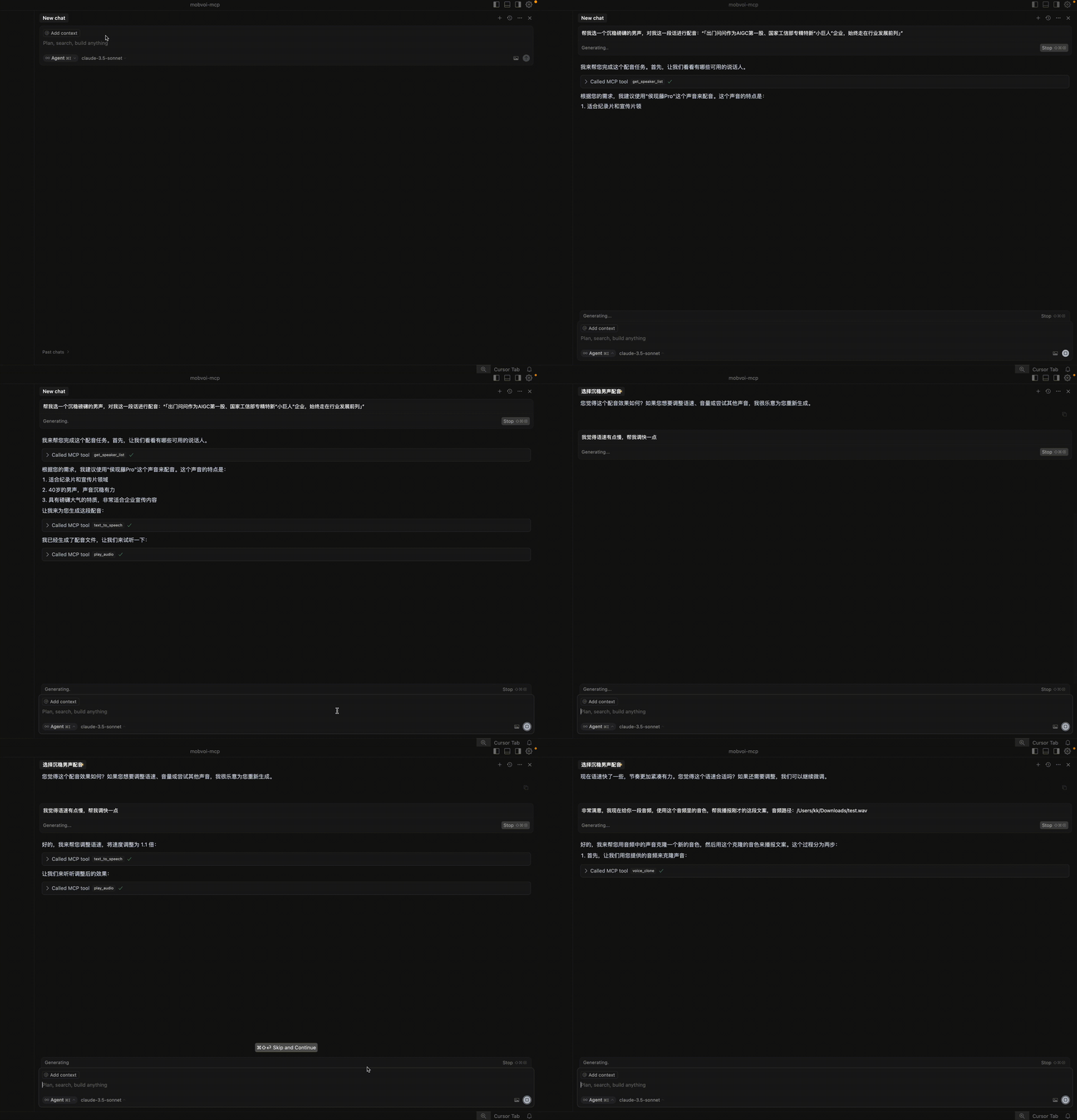
示例用法
- TTS演示视频:
故障排除
spawn uvx ENOENT
如果您遇到错误“MCP Mobvoi: spawn uvx ENOENT”,请通过在终端运行以下命令来确认其绝对路径:
which uvx
一旦您获得了绝对路径(例如,/usr/local/bin/uvx),请更新您的配置以使用该路径(例如,“command”:
“/usr/local/bin/uvx”)。这确保引用了正确的可执行文件。
MCP错误-32001:请求超时
如果遇到此错误,表明您的网络存在问题。如果您在中国大陆,强烈建议您按照以下方式配置额外的pypi源:
"Mobvoi": {
        ...
        "args": [
          "--index",
          "https://pypi.tuna.tsinghua.edu.cn/simple",
          "mobvoi-mcp"
        ],
       ...
      },
请注意,额外的pypi源需要配置在args的最前面。
无法同步最新的PyPI包
如果您遇到这种情况,可能是由以下原因造成的:1) 网络问题;2) 缓存问题;3) 指定的镜像源未同步mobvoi-mcp包。
如果您正在使用镜像源,应首先检查您使用的镜像源上是否已同步mobvoi-mcp包,方法如下:
pip index versions --index-url https://pypi.tuna.tsinghua.edu.cn/simple mobvoi-mcp
如果您能看到LATEST版本号与PyPI上的一致,则可以使用镜像源来更新最新的mobvoi-mcp包。否则,您只能使用https:
//pypi.org/simple来进行更新。通常,在PyPI上发布新包后,镜像源同步会有数十分钟的延迟。
同时,您可以参考以下配置来更新并清除缓存。
"Mobvoi": {
        ...
        "args": [
          "--upgrade",
          "--no-cache-dir",
          "--index",
          "https://pypi.tuna.tsinghua.edu.cn/simple",
          "mobvoi-mcp"
        ],
       ...
      },
请提供需要翻译的英文技术文档内容。您目前只提供了翻译要求,但没有给出具体的文档文本。请将文档的具体内容分享给我,以便我能够帮助您进行翻译。




