Asana AI连接器
该服务器实现允许AI助手与Asana的API进行交互,使用户能够通过自然语言请求管理任务、项目、工作区和评论。
MCP 服务配置
复制以下 JSON 到 OPClaw 或其他 MCP 客户端的配置文件中即可使用
{
  "mcpServers": {
    "asana": {
      "args": [
        "-y",
        "@cristip73/mcp-server-asana"
      ],
      "command": "npx",
      "env": {
        "ASANA_ACCESS_TOKEN": "your-asana-access-token",
        "DEFAULT_WORKSPACE_ID": "your-default-workspace-id"
      }
    }
  }
}该服务需要配置环境变量:ASANA_ACCESS_TOKEN、DEFAULT_WORKSPACE_ID
服务介绍
Asana 的 MCP 服务器

这个 Model Context Protocol (MCP) 服务器的 Asana 实现允许你通过 MCP 客户端(例如 Anthropic 的 Claude 桌面应用程序等)与 Asana API 进行通信。
更多关于 MCP 的详细信息:
- https://www.anthropic.com/news/model-context-protocol
- https://modelcontextprotocol.io/introduction
- https://github.com/modelcontextprotocol
使用方法
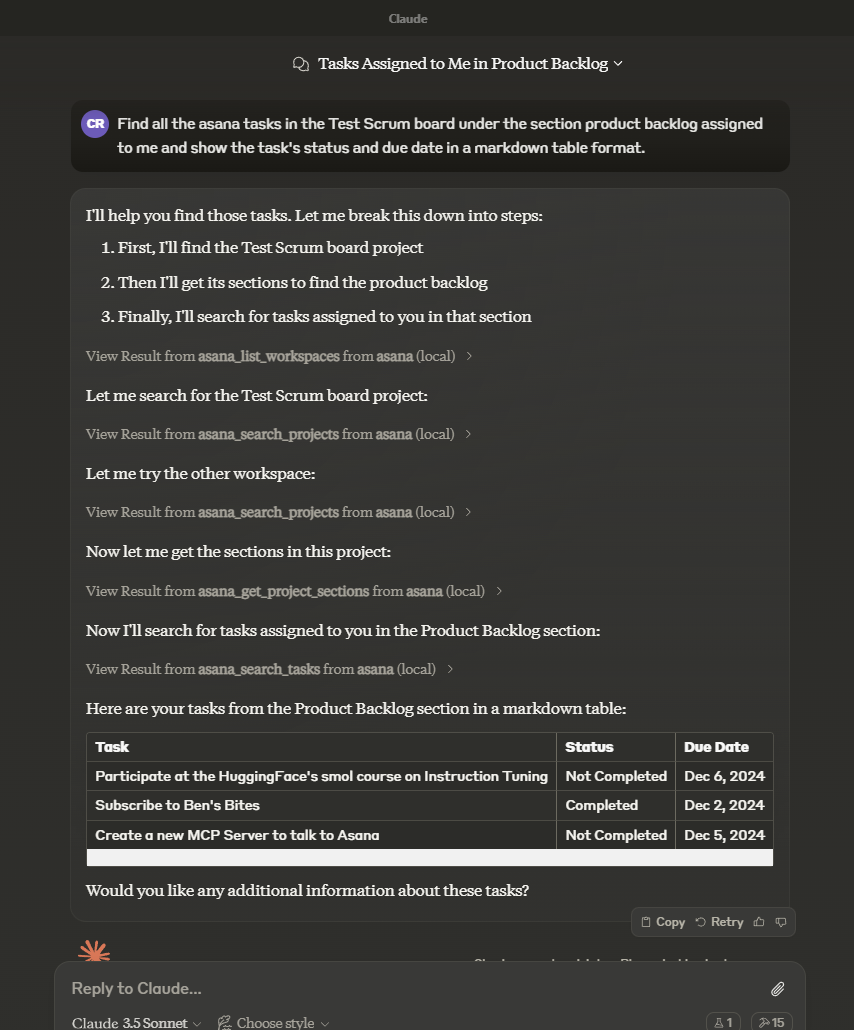
在你选择的 AI 工具(例如:Claude 桌面应用)中询问有关 asana 任务、项目、工作区和/或评论的信息。提及“asana”这个词将增加大语言模型选择正确工具的机会。
示例:
我们在 Sprint 30 项目中有多少未完成的 asana 任务?
另一个示例:
处理自定义字段
在更新或创建带有自定义字段的任务时,请使用以下格式:
asana_update_task({
  task_id: "TASK_ID",
  custom_fields: {
    "custom_field_gid": value  // The value format depends on the field type
  }
})
值的格式因字段类型而异:
- 枚举字段:使用选项的
enum_option.gid(而不是显示名称) - 文本字段:使用字符串
- 数字字段:使用数字
- 日期字段:使用 YYYY-MM-DD 格式的字符串
- 多枚举字段:使用枚举选项 GID 的数组
查找自定义字段 GID
要查找自定义字段及其枚举选项的 GID:
-
使用带有
opt_fields参数设置为包含自定义字段的asana_get_task:asana_get_task({ task_id: "TASK_ID", opt_fields: "custom_fields,custom_fields.enum_options" }) -
在响应中,查找
custom_fields数组。每个自定义字段将包含:gid:自定义字段的唯一标识符name:自定义字段的显示名称resource_subtype:自定义字段的类型(文本、数字、枚举等)- 对于枚举字段,检查
enum_options数组以找到每个选项的 GID
示例:更新枚举自定义字段
// First, get the task with custom fields
const taskDetails = asana_get_task({
  task_id: "1234567890",
  opt_fields: "custom_fields,custom_fields.enum_options"
});

// Find the custom field GID and enum option GID
const priorityFieldGid = "11112222";  // From taskDetails.custom_fields
const highPriorityOptionGid = "33334444";  // From the enum_options of the priority field

// Update the task with the custom field
asana_update_task({
  task_id: "1234567890",
  custom_fields: {
    [priorityFieldGid]: highPriorityOptionGid
  }
});
工具
asana_list_workspaces- List all available workspaces in Asana
- Optional input:
- opt_fields (string): Comma-separated list of optional fields to include
- Returns: List of workspaces
- Note: If DEFAULT_WORKSPACE_ID is set, this will only return that workspace instead of fetching all workspaces
asana_search_projects- Search for projects in Asana using name pattern matching
- Required input:
- name_pattern (string): Regular expression pattern to match project names
- Optional input:
- workspace (string): The workspace to search in (optional if DEFAULT_WORKSPACE_ID is set)
- team (string): The team to filter projects on
- archived (boolean): Only return archived projects (default: false)
- limit (number): Results per page (1-100)
- offset (string): Pagination offset token
- opt_fields (string): Comma-separated list of optional fields to include
- Returns: List of matching projects
- Note: Either workspace or team must be specified if DEFAULT_WORKSPACE_ID is not set
asana_search_tasks- Search tasks in a workspace with advanced filtering options
- Required input:
- workspace (string): The workspace to search in (optional if DEFAULT_WORKSPACE_ID is set)
- Optional input:
- text (string): Text to search for in task names and descriptions
- resource_subtype (string): Filter by task subtype (e.g. milestone)
- completed (boolean): Filter for completed tasks
- is_subtask (boolean): Filter for subtasks
- has_attachment (boolean): Filter for tasks with attachments
- is_blocked (boolean): Filter for tasks with incomplete dependencies
- is_blocking (boolean): Filter for incomplete tasks with dependents
- assignee, projects, sections, tags, teams, and many other advanced filters
- sort_by (string): Sort by due_date, created_at, completed_at, likes, modified_at (default: modified_at)
- sort_ascending (boolean): Sort in ascending order (default: false)
- opt_fields (string): Comma-separated list of optional fields to include
- custom_fields (object): Object containing custom field filters
- Returns: List of matching tasks
asana_get_task- Get detailed information about a specific task
- Required input:
- task_id (string): The task ID to retrieve
- Optional input:
- opt_fields (string): Comma-separated list of optional fields to include
- Returns: Detailed task information
asana_create_task- Create a new task in a project
- Required input:
- project_id (string): The project to create the task in
- name (string): Name of the task
- Optional input:
- notes (string): Description of the task
- html_notes (string): HTML-like formatted description of the task
- due_on (string): Due date in YYYY-MM-DD format
- assignee (string): Assignee (can be 'me' or a user ID)
- followers (array of strings): Array of user IDs to add as followers
- parent (string): The parent task ID to set this task under
- projects (array of strings): Array of project IDs to add this task to
- resource_subtype (string): The type of the task (default_task or milestone)
- custom_fields (object): Object mapping custom field GID strings to their values
- Returns: Created task information
asana_get_task_stories- Get comments and stories for a specific task
- Required input:
- task_id (string): The task ID to get stories for
- Optional input:
- opt_fields (string): Comma-separated list of optional fields to include
- Returns: List of task stories/comments
asana_update_task- Update an existing task's details
- Required input:
- task_id (string): The task ID to update
- Optional input:
- name (string): New name for the task
- notes (string): New description for the task
- due_on (string): New due date in YYYY-MM-DD format
- assignee (string): New assignee (can be 'me' or a user ID)
- completed (boolean): Mark task as completed or not
- resource_subtype (string): The type of the task (default_task or milestone)
- custom_fields (object): Object mapping custom field GID strings to their values
- Returns: Updated task information
asana_get_project- Get detailed information about a specific project
- Required input:
- project_id (string): The project ID to retrieve
- Optional input:
- opt_fields (string): Comma-separated list of optional fields to include
- Returns: Detailed project information
asana_get_project_task_counts- Get the number of tasks in a project
- Required input:
- project_id (string): The project ID to get task counts for
- Optional input:
- opt_fields (string): Comma-separated list of optional fields to include
- Returns: Task count information
asana_get_project_sections- Get sections in a project
- Required input:
- project_id (string): The project ID to get sections for
- Optional input:
- opt_fields (string): Comma-separated list of optional fields to include
- Returns: List of project sections
asana_create_task_story- Create a comment or story on a task
- Required input:
- task_id (string): The task ID to add the story to
- text (string): The text content of the story/comment
- Optional input:
- opt_fields (string): Comma-separated list of optional fields to include
- Returns: Created story information
asana_add_task_dependencies- Set dependencies for a task
- Required input:
- task_id (string): The task ID to add dependencies to
- dependencies (array of strings): Array of task IDs that this task depends on
- Returns: Updated task dependencies
asana_add_task_dependents- Set dependents for a task (tasks that depend on this task)
- Required input:
- task_id (string): The task ID to add dependents to
- dependents (array of strings): Array of task IDs that depend on this task
- Returns: Updated task dependents
asana_create_subtask- Create a new subtask for an existing task
- Required input:
- parent_task_id (string): The parent task ID to create the subtask under
- name (string): Name of the subtask
- Optional input:
- notes (string): Description of the subtask
- due_on (string): Due date in YYYY-MM-DD format
- assignee (string): Assignee (can be 'me' or a user ID)
- opt_fields (string): Comma-separated list of optional fields to include
- Returns: Created subtask information
asana_add_followers_to_task- Add followers to a task
- Required input:
- task_id (string): The task ID to add followers to
- followers (array of strings): Array of user IDs to add as followers to the task
- Returns: Updated task information
asana_get_multiple_tasks_by_gid- Get detailed information about multiple tasks by their GIDs (maximum 25 tasks)
- Required input:
- task_ids (array of strings or comma-separated string): Task GIDs to retrieve (max 25)
- Optional input:
- opt_fields (string): Comma-separated list of optional fields to include
- Returns: List of detailed task information
asana_get_project_status- Get a project status update
- Required input:
- project_status_gid (string): The project status GID to retrieve
- Optional input:
- opt_fields (string): Comma-separated list of optional fields to include
- Returns: Project status information
asana_get_project_statuses- Get all status updates for a project
- Required input:
- project_gid (string): The project GID to get statuses for
- Optional input:
- limit (number): Results per page (1-100)
- offset (string): Pagination offset token
- opt_fields (string): Comma-separated list of optional fields to include
- Returns: List of project status updates
asana_create_project_status- Create a new status update for a project
- Required input:
- project_gid (string): The project GID to create the status for
- text (string): The text content of the status update
- Optional input:
- color (string): The color of the status (green, yellow, red)
- title (string): The title of the status update
- html_text (string): HTML formatted text for the status update
- opt_fields (string): Comma-separated list of optional fields to include
- Returns: Created project status information
asana_delete_project_status- Delete a project status update
- Required input:
- project_status_gid (string): The project status GID to delete
- Returns: Deletion confirmation
asana_set_parent_for_task- Set the parent of a task and position the subtask within the other subtasks of that parent
- Required input:
- task_id (string): The task ID to operate on
- parent (string): The new parent of the task, or null for no parent
- Optional input:
- insert_after (string): A subtask of the parent to insert the task after, or null to insert at the beginning of the list
- insert_before (string): A subtask of the parent to insert the task before, or null to insert at the end of the list
- opt_fields (string): Comma-separated list of optional fields to include
- Returns: Updated task information
asana_get_tasks_for_tag- Get tasks for a specific tag
- Required input:
- tag_gid (string): The tag GID to retrieve tasks for
- Optional input:
- opt_fields (string): Comma-separated list of optional fields to include
- opt_pretty (boolean): Provides the response in a 'pretty' format
- limit (integer): The number of objects to return per page. The value must be between 1 and 100.
- offset (string): An offset to the next page returned by the API.
- Returns: List of tasks for the specified tag
asana_get_tags_for_workspace- Get tags in a workspace
- Required input:
- workspace_gid (string): Globally unique identifier for the workspace or organization (optional if DEFAULT_WORKSPACE_ID is set)
- Optional input:
- limit (integer): Results per page. The number of objects to return per page. The value must be between 1 and 100.
- offset (string): Offset token. An offset to the next page returned by the API.
- opt_fields (string): Comma-separated list of optional fields to include
- Returns: List of tags in the workspace
asana_create_section_for_project- Create a new section in a project
- Required input:
- project_id (string): The project ID to create the section in
- name (string): Name of the section to create
- Optional input:
- opt_fields (string): Comma-separated list of optional fields to include
- Returns: Created section information
asana_add_task_to_section- Add a task to a specific section in a project
- Required input:
- section_id (string): The section ID to add the task to
- task_id (string): The task ID to add to the section
- Optional input:
- opt_fields (string): Comma-separated list of optional fields to include
- Returns: Operation result
asana_create_project- Create a new project in a workspace
- Required input:
- workspace_id (string): The workspace ID to create the project in (optional if DEFAULT_WORKSPACE_ID is set)
- name (string): Name of the project to create
- team_id (string): REQUIRED for organization workspaces - The team GID to share the project with
- Optional input:
- public (boolean): Whether the project is public to the organization (default: false)
- archived (boolean): Whether the project is archived (default: false)
- color (string): Color of the project (light-green, light-orange, light-blue, etc.)
- layout (string): The layout of the project (board, list, timeline, or calendar)
- default_view (string): The default view of the project (list, board, calendar, timeline, or gantt)
- due_on (string): The date on which this project is due (YYYY-MM-DD format)
- start_on (string): The day on which work for this project begins (YYYY-MM-DD format)
- notes (string): Free-form textual information associated with the project
- opt_fields (string): Comma-separated list of optional fields to include
- Returns: Created project information
asana_get_teams_for_user- Get teams to which the user has access
- Required input:
- user_gid (string): The user GID to get teams for. Use 'me' to get teams for the current user.
- Optional input:
- opt_fields (string): Comma-separated list of optional fields to include
- Returns: List of teams the user has access to
asana_get_teams_for_workspace- Get teams in a workspace
- Required input:
- workspace_gid (string): The workspace GID to get teams for (optional if DEFAULT_WORKSPACE_ID is set)
- Optional input:
- opt_fields (string): Comma-separated list of optional fields to include
- Returns: List of teams in the workspace
asana_list_workspace_users- Get users in a workspace
- Required input:
- workspace_id (string): The workspace ID to get users for (optional if DEFAULT_WORKSPACE_ID is set)
- Optional input:
- limit (integer): Results per page (1-100)
- offset (string): Pagination offset token
- opt_fields (string): Comma-separated list of optional fields to include (defaults to "name,email")
- auto_paginate (boolean): Whether to automatically fetch all pages
- max_pages (integer): Maximum number of pages to fetch when auto_paginate is true
- Returns: List of users in the workspace
asana_get_project_hierarchy- Get the complete hierarchical structure of an Asana project, including sections, tasks, and subtasks
- Required input:
- project_id (string): The project ID to get hierarchy for
- Optional input:
- include_completed_tasks (boolean): Include completed tasks (default: false)
- include_subtasks (boolean): Include subtasks for each task (default: true)
- include_completed_subtasks (boolean): Include completed subtasks (default: follows include_completed_tasks)
- max_subtask_depth (number): Maximum depth of subtasks to retrieve (default: 1)
- opt_fields_tasks (string): Optional fields for tasks
- opt_fields_subtasks (string): Optional fields for subtasks
- opt_fields_sections (string): Optional fields for sections
- opt_fields_project (string): Optional fields for project
- limit (number): Max results per page (1-100)
- offset (string): Pagination token from previous response
- auto_paginate (boolean): Whether to automatically fetch all pages
- max_pages (number): Maximum pages to fetch when auto_paginate is true
- Returns: Hierarchical project structure with statistics
提示
task-summary- 根据任务的笔记、自定义字段和评论获取任务摘要和状态更新
- 所需输入:
- task_id (字符串):要获取摘要的任务ID
- 返回:一个详细的提示,包含生成任务摘要的说明
资源
无
设置
-
创建 Asana 账户:
- 访问 Asana。
- 点击“注册”。
-
获取 Asana 访问令牌:
- 您可以从 Asana 开发者控制台生成个人访问令牌。
- 更多详情请见:https://developers.asana.com/docs/personal-access-token
-
可选:获取您的默认工作区 ID:
- 如果您主要使用一个工作区,可以设置默认工作区 ID。
- 使用 Asana API 列出您的工作区,或在 Asana 中进入您的工作区并从 URL 中复制 ID。
- 当设置了默认工作区 ID 后,每次调用 API 时不需要指定工作区。
- 如果没有默认工作区,服务器将调用
asana_list_workspaces来获取可用的工作区列表。
-
配置 Claude Desktop:
将以下内容添加到您的claude_desktop_config.json文件中:{ "mcpServers": { "asana": { "command": "npx", "args": ["-y", "@cristip73/mcp-server-asana"], "env": { "ASANA_ACCESS_TOKEN": "your-asana-access-token", "DEFAULT_WORKSPACE_ID": "your-default-workspace-id" } } } }
故障排除
如果遇到权限错误:
- 确保您的 Asana 计划允许 API 访问
- 确认在
claude_desktop_config.json中正确设置了访问令牌和配置。
贡献
克隆此仓库并开始编码。
使用 MCP Inspector 在本地测试
如果您想测试所做的更改,可以这样使用 MCP Inspector:
npm run inspector
这将使客户端暴露在端口 5173 上,服务器暴露在端口 3000 上。
如果这些端口已被其他程序占用,您可以使用:
CLIENT_PORT=5009 SERVER_PORT=3009 npm run inspector
许可证
此 MCP 服务器根据 MIT 许可证发布。这意味着您可以自由使用、修改和分发该软件,但须遵守 MIT 许可证的条款和条件。更多细节,请参阅项目仓库中的 LICENSE 文件。




