ODBC 服务器
提供对任何通过ODBC连接器(驱动程序)可访问的数据库管理系统(DBMS)的通用开放数据库连接(ODBC)。
服务介绍
介绍
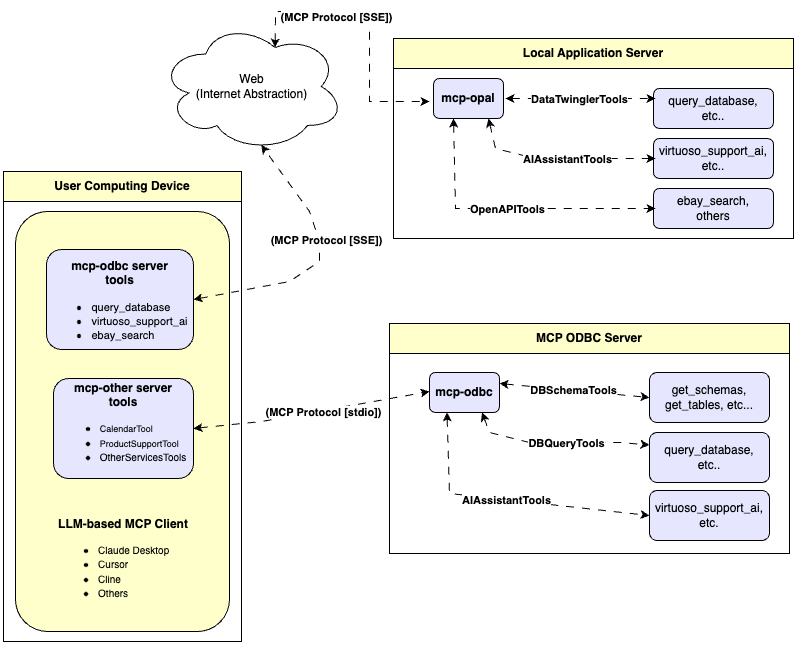
本文档介绍了用于 Model Context Protocol (MCP) 的通用 ODBC 服务器(称为 mcp-odbc 服务器)的设置和使用。它被开发出来是为了通过为特定 ODBC 连接器(或驱动程序)配置的数据源名称,为大型语言模型提供对 ODBC 可访问数据源的透明访问。
服务器实现
这个针对 ODBC 的 MCP 服务器是在 node-odbc 之上构建的一个小型 TypeScript 层。它通过 node.js(特别是使用 'npx' 对于 TypeScript)将调用路由到主机系统的本地 ODBC 驱动管理器。
操作环境设置与先决条件
尽管以下示例是针对 Virtuoso ODBC 连接器的,但本指南也适用于其他 ODBC 连接器。我们强烈鼓励贡献有关其他数据库管理系统相关的代码和使用演示,以便将其整合到此项目中。
关键系统组件
- 检查 node.js 版本;如果不是 21.1.0,请使用以下命令升级或安装:
nvm install v21.1.0 - 使用以下命令安装 MCP 组件:
npm install @modelcontextprotocol/sdk zod tsx odbc dotenv - 使用以下命令设置
nvm版本:nvm alias default 21.1.0
安装
- 运行
git clone https://github.com/OpenLinkSoftware/mcp-odbc-server.git - 更改目录
cd mcp-odbc-server - 运行
npm init -y - 向
package.json文件添加条目"type":"module" - 运行
npm install @modelcontextprotocol/sdk zod tsx odbc dotenv
unixODBC 运行时环境检查
- 通过运行
odbcinst -j检查安装配置(即关键 INI 文件的位置) - 通过运行
odbcinst -q -s列出可用的数据源名称
环境变量
作为良好的安全实践,您应该使用与 mcp-ser 相同目录下的 .env 文件来设置目标大型语言模型 API 密钥(如果您希望通过 ODBC 使用 OpenLink AI 层 (OPAL))、ODBC 数据源名称 (ODBC_DSN)、用户 (ODBC_USER)、密码 (ODBC_PWD) 和 ODBC INI (ODBCINI) 的绑定。
API_KEY=sk-xxx
ODBC_DSN=Local Virtuoso
ODBC_USER=dba
ODBC_PASSWORD=dba
ODBCINI=/Library/ODBC/odbc.ini
使用
工具
成功安装后,以下工具将可用于 MCP 客户端应用程序。
概览
| 名称 | 描述 |
|---|---|
| get_schemas | 列出连接的数据库管理系统(DBMS)可访问的数据库模式。 |
| get_tables | 列出与所选数据库模式关联的表。 |
| describe_table | 提供与指定数据库模式关联的表的描述。这包括有关列名、数据类型、空值处理、自增、主键和外键的信息。 |
| filter_table_names | 根据q输入字段中的子字符串模式,列出与所选数据库模式关联的表。 |
| query_database | 执行SQL查询并将结果以JSONL格式返回。 |
| execute_query | 执行SQL查询并将结果以JSONL格式返回。 |
| execute_query_md | 执行SQL查询并将结果以Markdown表格格式返回。 |
| spasql_query | 执行SPASQL查询并返回结果。 |
| sparql_query | 执行SPARQL查询并返回结果。 |
| virtuoso_support_ai | 与Virtuoso支持助手/代理交互——这是Virtuoso特有的功能,用于与LLM交互 |
详细描述
希望这段翻译对你有帮助!如果还有其他需要,请告诉我。
-
get_schemas
- Retrieve and return a list of all schema names from the connected database.
- Input parameters:
user(string, optional): Database username. Defaults to "demo".password(string, optional): Database password. Defaults to "demo".dsn(string, optional): ODBC data source name. Defaults to "Local Virtuoso".
- Returns a JSON string array of schema names.
-
get_tables
- Retrieve and return a list containing information about tables in a specified schema. If no schema is provided, uses the connection's default schema.
- Input parameters:
schema(string, optional): Database schema to filter tables. Defaults to connection default.user(string, optional): Database username. Defaults to "demo".password(string, optional): Database password. Defaults to "demo".dsn(string, optional): ODBC data source name. Defaults to "Local Virtuoso".
- Returns a JSON string containing table information (e.g., TABLE_CAT, TABLE_SCHEM, TABLE_NAME, TABLE_TYPE).
-
filter_table_names
- Filters and returns information about tables whose names contain a specific substring.
- Input parameters:
q(string, required): The substring to search for within table names.schema(string, optional): Database schema to filter tables. Defaults to connection default.user(string, optional): Database username. Defaults to "demo".password(string, optional): Database password. Defaults to "demo".dsn(string, optional): ODBC data source name. Defaults to "Local Virtuoso".
- Returns a JSON string containing information for matching tables.
-
describe_table
- Retrieve and return detailed information about the columns of a specific table.
- Input parameters:
schema(string, required): The database schema name containing the table.table(string, required): The name of the table to describe.user(string, optional): Database username. Defaults to "demo".password(string, optional): Database password. Defaults to "demo".dsn(string, optional): ODBC data source name. Defaults to "Local Virtuoso".
- Returns a JSON string describing the table's columns (e.g., COLUMN_NAME, TYPE_NAME, COLUMN_SIZE, IS_NULLABLE).
-
query_database
- Execute a standard SQL query and return the results in JSON format.
- Input parameters:
query(string, required): The SQL query string to execute.user(string, optional): Database username. Defaults to "demo".password(string, optional): Database password. Defaults to "demo".dsn(string, optional): ODBC data source name. Defaults to "Local Virtuoso".
- Returns query results as a JSON string.
-
query_database_md
- Execute a standard SQL query and return the results formatted as a Markdown table.
- Input parameters:
query(string, required): The SQL query string to execute.user(string, optional): Database username. Defaults to "demo".password(string, optional): Database password. Defaults to "demo".dsn(string, optional): ODBC data source name. Defaults to "Local Virtuoso".
- Returns query results as a Markdown table string.
-
query_database_jsonl
- Execute a standard SQL query and return the results in JSON Lines (JSONL) format (one JSON object per line).
- Input parameters:
query(string, required): The SQL query string to execute.user(string, optional): Database username. Defaults to "demo".password(string, optional): Database password. Defaults to "demo".dsn(string, optional): ODBC data source name. Defaults to "Local Virtuoso".
- Returns query results as a JSONL string.
-
spasql_query
- Execute a SPASQL (SQL/SPARQL hybrid) query return results. This is a Virtuoso-specific feature.
- Input parameters:
query(string, required): The SPASQL query string.max_rows(number, optional): Maximum number of rows to return. Defaults to 20.timeout(number, optional): Query timeout in milliseconds. Defaults to 30000.user(string, optional): Database username. Defaults to "demo".password(string, optional): Database password. Defaults to "demo".dsn(string, optional): ODBC data source name. Defaults to "Local Virtuoso".
- Returns the result from the underlying stored procedure call (e.g.,
Demo.demo.execute_spasql_query).
-
sparql_query
- Execute a SPARQL query and return results. This is a Virtuoso-specific feature.
- Input parameters:
query(string, required): The SPARQL query string.format(string, optional): Desired result format. Defaults to 'json'.timeout(number, optional): Query timeout in milliseconds. Defaults to 30000.user(string, optional): Database username. Defaults to "demo".password(string, optional): Database password. Defaults to "demo".dsn(string, optional): ODBC data source name. Defaults to "Local Virtuoso".
- Returns the result from the underlying function call (e.g.,
"UB".dba."sparqlQuery").
-
virtuoso_support_ai
- Utilizes a Virtuoso-specific AI Assistant function, passing a prompt and optional API key. This is a Virtuoso-specific feature.
- Input parameters:
prompt(string, required): The prompt text for the AI function.api_key(string, optional): API key for the AI service. Defaults to "none".user(string, optional): Database username. Defaults to "demo".password(string, optional): Database password. Defaults to "demo".dsn(string, optional): ODBC data source name. Defaults to "Local Virtuoso".
- Returns the result from the AI Support Assistant function call (e.g.,
DEMO.DBA.OAI_VIRTUOSO_SUPPORT_AI).
基本安装测试与故障排除
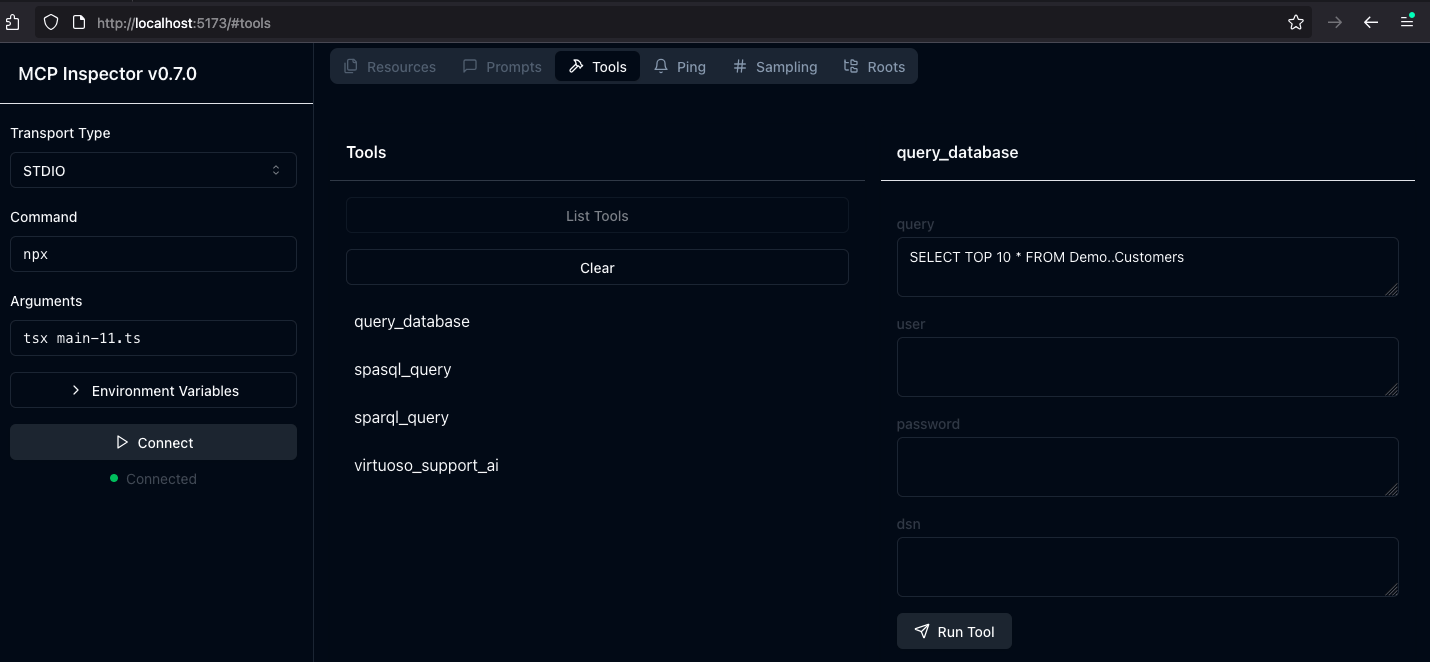
- 从 mcp-server 目录/文件夹中使用以下命令启动检查器:
ODBCINI=/Library/ODBC/odbc.ini npx -y @modelcontextprotocol/inspector npx tsx ./src/main.ts - 点击“连接”按钮,然后点击“工具”选项卡开始。
MCP 应用程序使用
Claude 桌面配置
此配置文件的路径为:~{username}/Library/Application Support/Claude/claude_desktop_config.json 。
{
    "mcpServers": {
        "ODBC": {
            "command": "/path/to/.nvm/versions/node/v21.1.0/bin/node",
            "args": [
                "/path/to/mcp-odbc-server/node_modules/.bin/tsx",
                "/path/to/mcp-odbc-server/src/main.ts"
            ],
            "env": {
                "ODBCINI": "/Library/ODBC/odbc.ini",
                "NODE_VERSION": "v21.1.0",
                "PATH": "~/.nvm/versions/node/v21.1.0/bin:${PATH}"
            },
            "disabled": false,
            "autoApprove": []
        }
    }
}
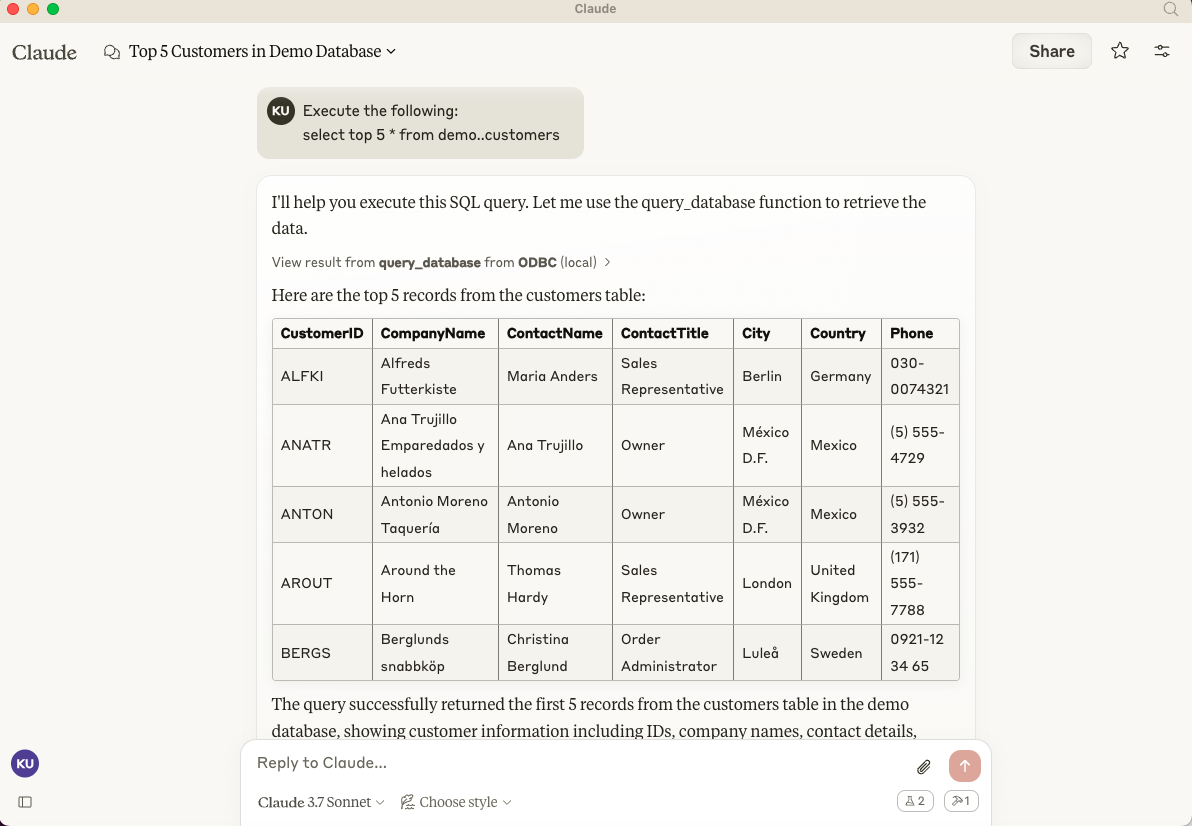
Claude 桌面使用
- 启动应用程序
- 通过设置 | 开发者用户界面应用配置(如上)
- 确保你有一个工作中的 ODBC 连接到数据源名称 (DSN)
- 提供一个请求执行查询的提示,例如:
Execute the following query: SELECT TOP * from Demo..Customers
Cline (Visual Studio 扩展) 配置
此配置文件的路径为:~{username}/Library/Application\ Support/Code/User/globalStorage/saoudrizwan.claude-dev/settings/cline_mcp_settings.json
{
  "mcpServers": {
    "ODBC": {
      "command": "/path/to/.nvm/versions/node/v21.1.0/bin/node",
      "args": [
        "/path/to/mcp-odbc-server/node_modules/.bin/tsx",
        "/path/to/mcp-odbc-server/src/main.ts"
      ],
      "env": {
        "ODBCINI": "/Library/ODBC/odbc.ini",
        "NODE_VERSION": "v21.1.0",
        "PATH": "/path/to/.nvm/versions/node/v21.1.0/bin:${PATH}"
      },
      "disabled": false,
      "autoApprove": []
    }
  }
}
Cline (Visual Studio 扩展) 使用
- 使用 Shift+Command+P 打开命令面板
- 输入:Cline
- 选择:Cline 视图,这将在 VSCode 侧边栏中打开 Cline UI
- 使用四个方块图标访问用于安装和配置 MCP 服务器的 UI
- 应用 Cline 配置(如上)
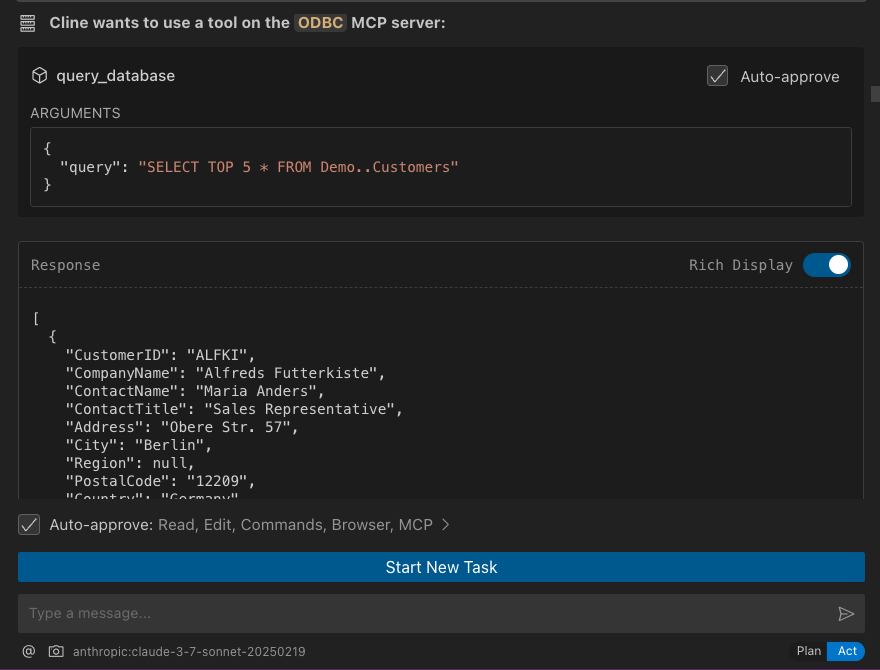
- 返回扩展的主要 UI 并开始一个新的任务,请求处理以下提示:“Execute the following query: SELECT TOP 5 * from Demo..Customers”
Cursor 配置
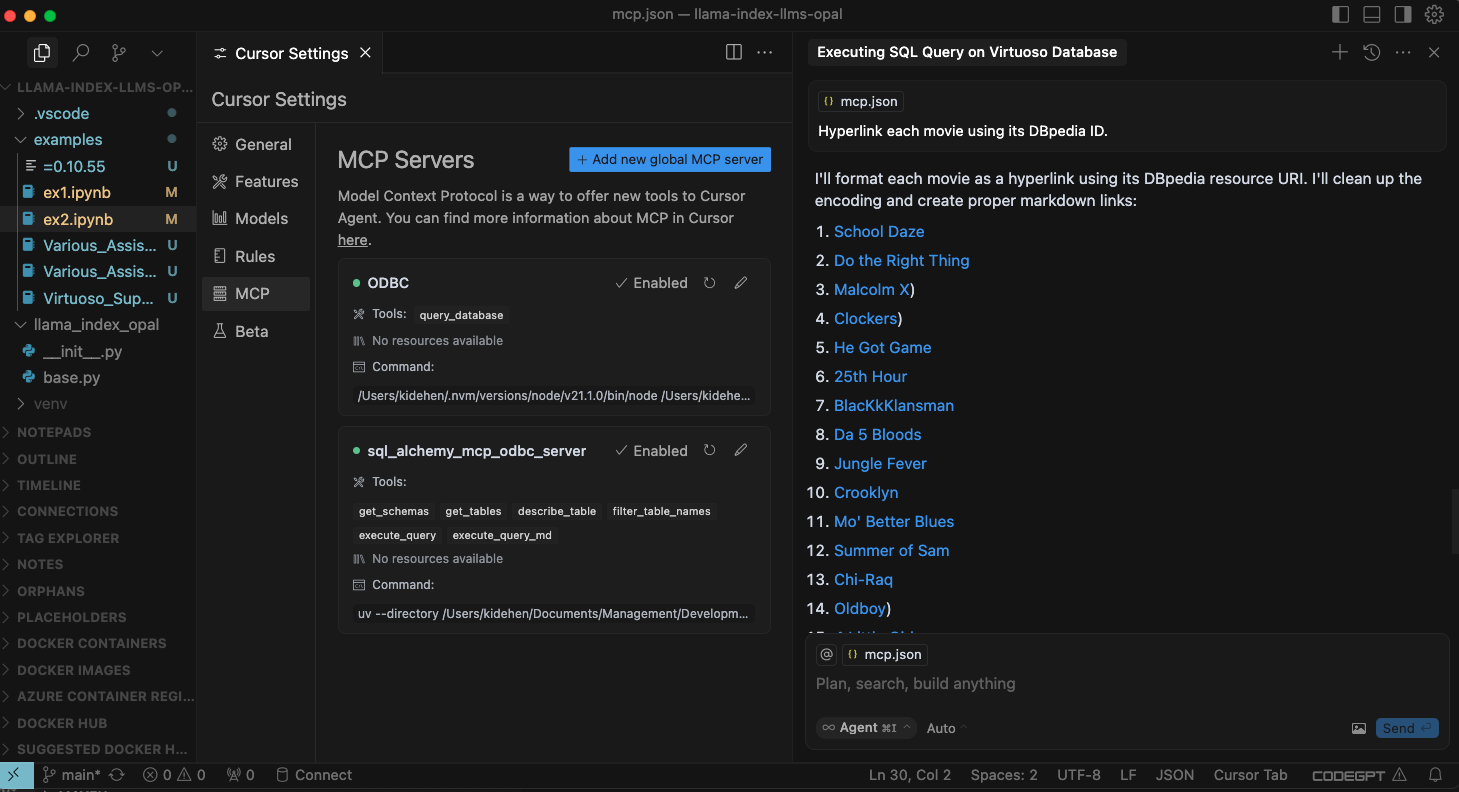
使用设置齿轮打开包含用于注册和配置 mcp servers 的 MCP 菜单项的配置菜单。
Cursor 使用
- 使用
Command 或 Control + I键组合打开聊天界面 - 从 UI 左下角的下拉菜单中选择
Agent,因为默认是Ask - 输入你的提示,使用模式
@odbc {rest-of-prompt}来限定mcp-server for odbc的使用 - 点击“接受”以执行提示。